

BNB Smart Chain is one of the most popular networks for working with cryptocurrency. Users transfer stablecoins through it, connect to dApps, and work with DeFi. For this they use BSC wallets. The main reason for its popularity is low fees and fast transaction processing.
In this article we will cover how to create a BSC wallet, what sets the BEP20 standard apart from other networks, and which features truly matter for safe work with cryptocurrency.
What Is a BEP20 Wallet and How It Differs from ERC20 and TRC20
BEP20 wallet is an application or service with BNB Smart Chain support. It is used for storing tokens, sending, and connecting to Web3 applications. Through such a wallet, a user can receive USDT, sign transactions, and work with DeFi services.
The BEP-20 standard defines the rules for how tokens operate within the BSC network. It handles coin transfers, balance display, and smart contract interactions. Almost every modern non-custodial wallet supports this format.
ERC-20 belongs to the Ethereum network. TRC-20 operates in the TRON blockchain. BEP-20 is used in the BSC network. The token name may be the same, but the network will be different. This is important to keep in mind before sending funds.
The main difference for the user is speed and transaction fees. Gas on Ethereum is usually more expensive. On BSC fees are lower. That is why BEP20 is often used for USDT transfers.
What Features Matter When Choosing a BSC Network Solution
Before you create a BEP20 wallet, check the security level. A good wallet should give full control over funds. The user stores the access data for their assets themselves.
It is better to choose a non-custodial wallet. In such a solution only the owner controls the funds. An exchange or third-party service has no access to the funds.
Also pay attention to BSC network support. The wallet must work correctly with BEP-20 standard tokens. This will simplify working with transfers and DeFi protocols.
For any operation on the network, the fee (gas) is technically always paid in BNB. Even if the user is sending USDT, the system will still deduct a small BNB commission to confirm the transaction.
However, some services, including Crypto Office, handle this technical side themselves and allow the user to pay the fee in USDT – that is, the service independently handles the conversion.
A useful feature is a built-in explorer or quick access to BscScan. This allows you to check the status of transactions, view transfer history, and track token movement within the network. It is also worth checking how the wallet’s protection works. A reliable solution provides additional security measures, including PIN codes and 2FA.
Step-by-Step Guide: How to Create a BSC Wallet
If you are looking for how to open a BEP20 wallet, the most important thing is choosing a reliable and convenient service. Today users increasingly choose the Crypto Office solution. It works in Telegram and gives access to key features without KYC.
To get started with BEP20 tokens in Crypto Office:
Launch the bot in Telegram with the /start command.
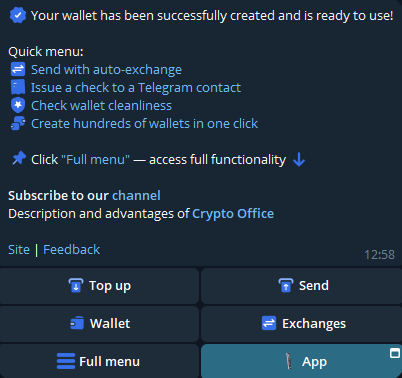
Your wallet with BEP20 support is ready to use.
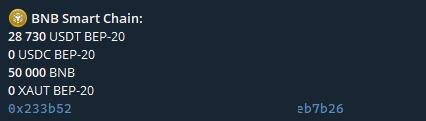
After creating the wallet, go to settings and enable two-factor authentication (2FA). You can also set a PIN code for additional fund security.
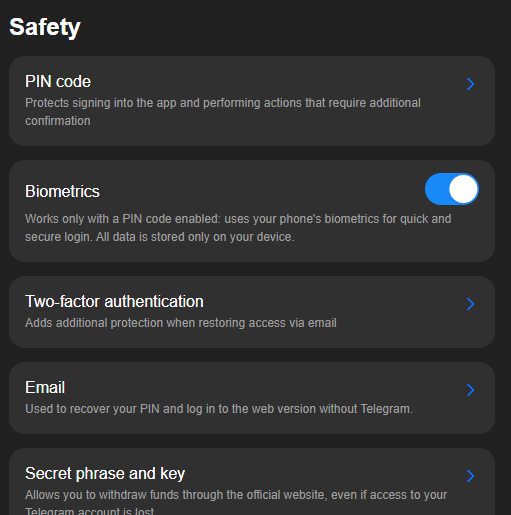
To receive BEP20 tokens to your balance, go to “Wallet” and copy the wallet address from the “BNB Smart Chain” section. Then send funds to it.
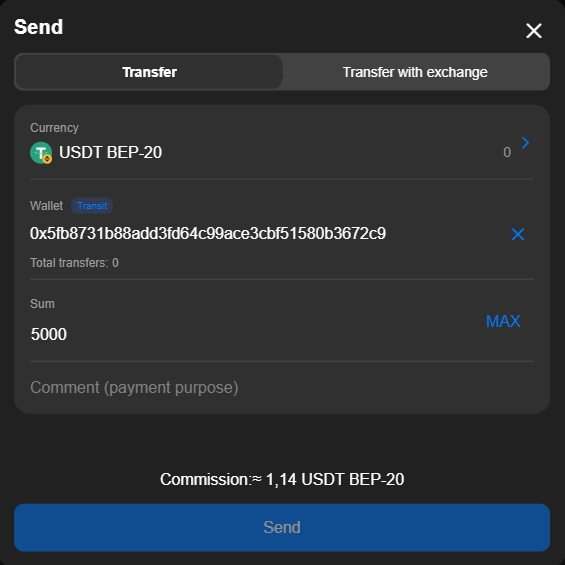
To send BSC-based tokens, use the “Send” option. Then enter the other user’s address and confirm the transfer.
Crypto Office is convenient because it requires no complex setup. The user immediately gets a ready-to-use USDT BEP20 wallet. This reduces the risk of errors when working with tokens and simplifies entry into Web3. Such solutions are becoming popular because they simplify working with crypto. The user does not think about technical details and immediately gets access to decentralized services.
How to Work with USDT in the BEP20 Network (Transfers, Storage, Fees)
A USDT BEP20 wallet is used for token operations within the network. The user can store USDT, send it to other users, and receive transfers. All of this happens through the blockchain and is recorded on the network.
To make a transfer, the user enters the BSC wallet address and the amount. A transaction is then created and sent to the network. It goes through confirmation and becomes part of the blockchain.
For transaction monitoring, an explorer is used. It shows the transaction status and number of confirmations. This helps you understand whether the transfer went through on the network.
Crypto Office saves all transaction details in the user’s personal account. The wallet also automatically verifies address correctness, eliminating the risk of accidental transfers.

BEP20 Wallet Security
Security is the foundation of cryptocurrency. A user’s financial system depends on access to the seed phrase and private keys. If they fall into the hands of third parties, control over assets is lost completely. This rule applies to any Web3 solution.
The BNB Smart Chain network operates through a decentralized protocol, so recovering access without keys is impossible. That is why it is important for the user to properly set up protection before the first transaction.
How to Set Up Two-Factor Authentication
Two-factor authentication adds an extra layer of protection. This security measure reduces the risk of unauthorized access to the wallet.
In most applications, enabling 2FA happens in the settings. The user links an authenticator app and confirms the action via a code. Without 2FA, an attacker only needs to gain access to the device or browser to attempt initiating a transfer.
How to Check a BSC BEP20 Wallet Before the First Transaction
Here are the main steps for checking the wallet before transactions.
- Before first use, it is important to make sure the BSC wallet address is correctly displayed and linked to the right network.
- Then verify that the correct BEP-20 network is selected. A mistake at this stage means tokens will disappear permanently.
- It is also worth testing the wallet with a small transfer. This is standard practice. A test transfer confirms that the address is supported by BSC and funds are credited correctly.
- For additional verification, you can use a blockchain explorer. For BEP20, bscscan.com works great. It shows the transaction status and confirms that the transaction is recorded on the network.
Common Mistakes When Working with BSC and How to Avoid Them
When working with BEP20 wallets, users often make the same mistakes. Most of them are related to inattention.
One of the most common is sending tokens to the wrong network. The user sees USDT but does not check the standard. As a result, the coins get lost in the blockchain and do not appear in the recipient’s wallet.
Another mistake relates to fees. Users often forget that they need to account for a little extra in the transfer amount. This portion will be deducted as the network fee.
Sometimes users copy the BSC wallet address incorrectly. Even one wrong character makes the BEP20 transfer impossible to recover. So it is important to always verify the address manually before sending.
Avoiding these mistakes is simple. Always check the network, monitor transaction confirmations in the explorer, and do not rush. In most cases, security depends on the user’s attentiveness, not the complexity of the system.
Conclusion
BEP20 wallets are a key tool for working with digital assets in BNB Smart Chain. They allow users to store tokens, make transfers, receive funds, and interact with Web3. Understanding what a BSC wallet is and how the blockchain works helps avoid mistakes.
Journalist and editor specializing in crypto markets and blockchain infrastructure, covering regulatory shifts, institutional adoption, and the evolution of Web3 protocols.