

Over the past few years, Telegram has evolved into a full-featured ecosystem. Beyond its core messaging capabilities, the platform now supports mini-apps, a built-in crypto wallet, P2P trading, and a wide range of financial services. Many of these are designed specifically for storing and transferring USDT between users. The native Telegram Wallet is one well-known example, but the ecosystem also offers more advanced, professional-grade solutions.
In this guide, we'll walk you through how to send USDT in Telegram step by step – including what to do if your balance is empty, and what to watch out for during any crypto transfer.
What You Need to Know Before Sending USDT in Telegram
Before you send USDT to a Telegram wallet, there are a few important factors to keep in mind.
First, always double-check the recipient address. Any mistake in a crypto wallet address will result in a permanent loss of funds – blockchain transactions cannot be reversed.
Second, confirm the network you're using. USDT exists across multiple blockchains: Ethereum, TON, TRON, Solana, and BNB Smart Chain. The network you choose will determine both the speed of the transfer and the transaction fee.
Third, factor in fees and limits. Different wallets and services charge different amounts for sending or receiving USDT. Fees can be fixed or vary by transfer size. All on-chain USDT transfers also require a network fee (gas), which depends on the blockchain and its current load.
Fourth, account for confirmation time. Every blockchain requires multiple confirmations before a transfer is finalized. More confirmations mean greater security, but they also take more time.
Which USDT Networks Are Supported in Telegram Wallets
Telegram-based crypto wallets typically support the following USDT networks:
- Ethereum (ERC-20)
- TON (The Open Network)
- TRON (TRC-20)
- Solana (SPL)
- BNB Smart Chain (BEP-20)
In addition to Tether (USDT), most Telegram wallets also support BTC, ETH, USDC, SOL, and other popular tokens.
How to Send USDT on Telegram: Step-by-Step
Beyond the official Wallet bot, there are more advanced Telegram-native applications for managing and sending crypto. One gaining significant traction is Crypto Office – a wallet that combines speed, security, and ease of use. Users can store, receive, and send USDT on Telegram directly within the app.
Here's how to get started with Crypto Office.
Sending USDT from an Exchange to Your Telegram Wallet
Transferring USDT from a cryptocurrency exchange to your wallet address is the most common way to fund your balance. Here's an example using Bybit. To send USDT to a Telegram wallet from an exchange, follow these steps:
Log in to your exchange account and navigate to "Withdraw".

- Select USDT and choose your preferred network (e.g., TRON or Ethereum).
- Copy your Crypto Office wallet address from the Telegram bot.
Paste the address into the withdrawal form, enter the amount, and confirm the transaction.
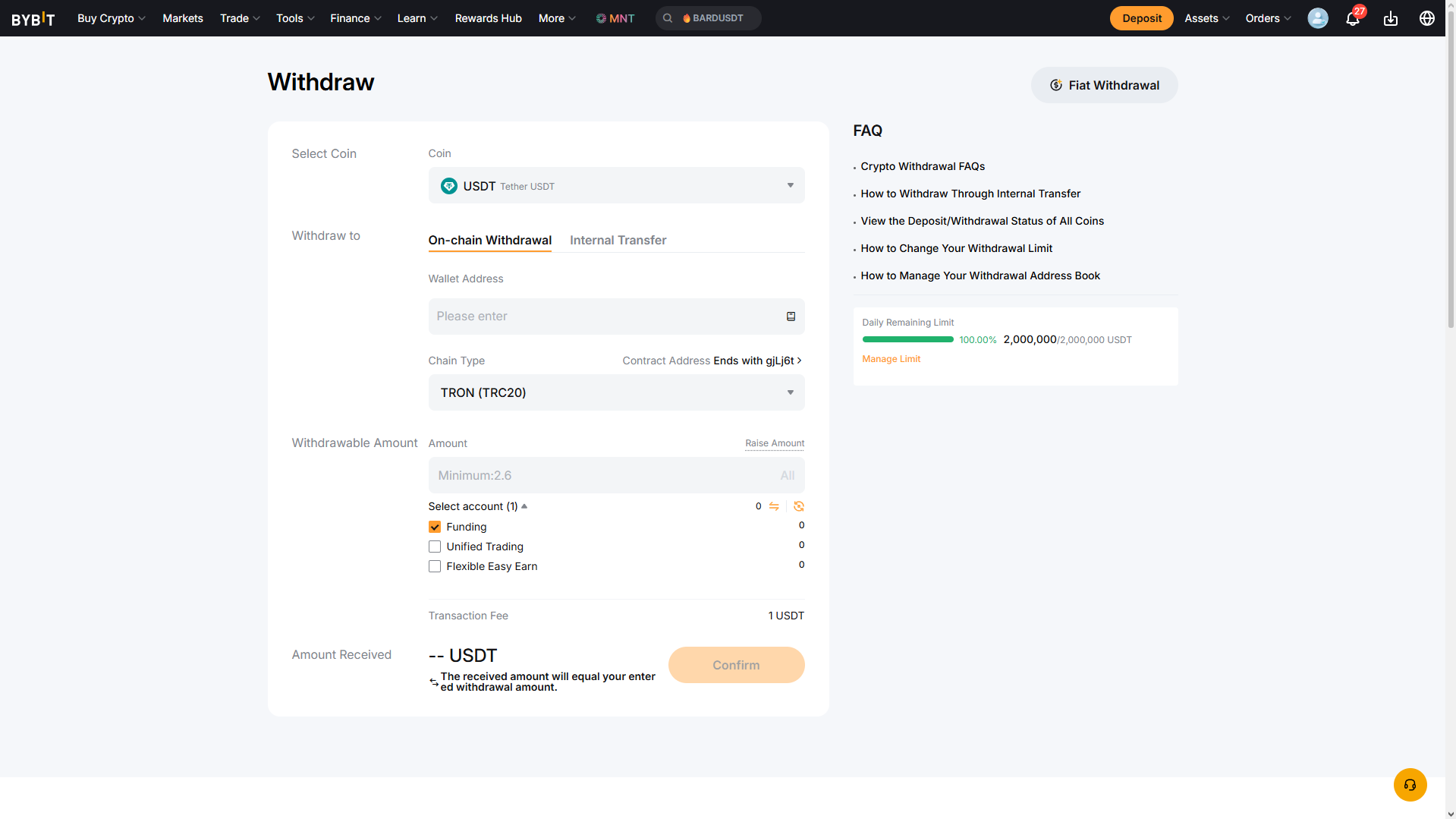
- After a few blockchain confirmations, your USDT will appear in your Crypto Office wallet.
How to Send USDT Directly in a Telegram Chat
Crypto Office makes it possible to send USDT in Telegram right from any chat window. To do this:
- Open the chat with the recipient.
- Type the command: @officeapp [recipient's USDT wallet address] [amount].
Press Enter to send. Funds are credited to the recipient instantly.

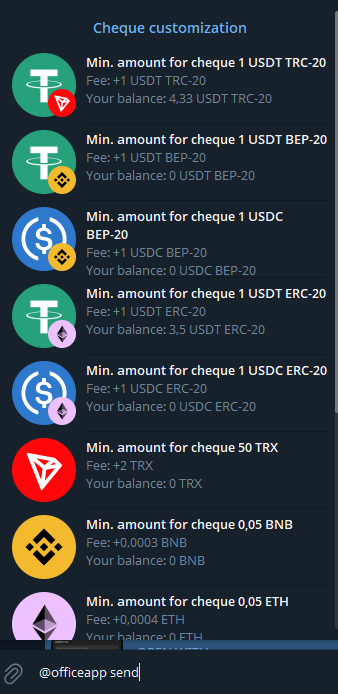
You can also send USDT using a check. In that case:
- Type @officeapp send [amount] in the chat with the recipient.
- Select USDT and choose the network.
Tap "Issue check" to complete the transfer.

How to Send USDT in Telegram Without Having USDT in Your Balance
Not everyone has USDT readily available – your balance might be in a different cryptocurrency or on an incompatible network. This is not a problem.
Some Telegram wallets, including Crypto Office, allow you to send USDT on Telegram using a different cryptocurrency such as BTC or ETH. The recipient will still receive USDT. Here's how:
- Go to the "Send" section and select "Send with Exchange".
- Choose the available cryptocurrency in your balance.
- In the "To" field, select USDT and choose the desired network.
- Enter the recipient's USDT wallet address.
Confirm the transfer.
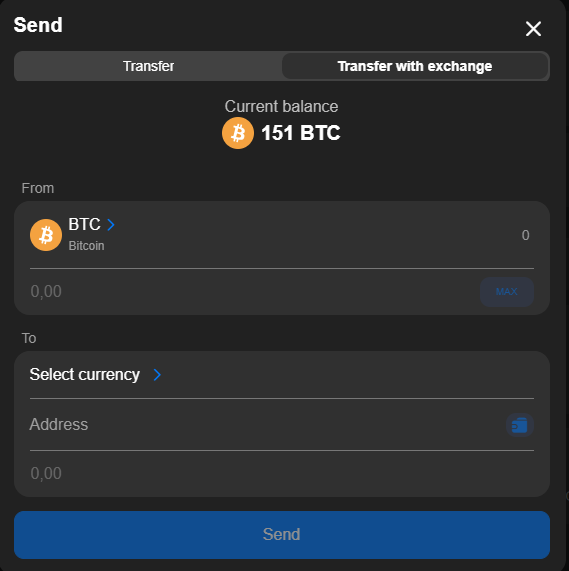
The service automatically converts your cryptocurrency into Tether at a competitive rate. This process also includes built-in AML (Anti-Money Laundering) control – the system checks addresses and transactions for compliance before every transfer. This reduces the risk of funds being frozen and improves overall transaction reliability. Additionally, Crypto Office uses exchange liquidity to ensure the recipient receives verified, exchange-grade USDT.
What to Do If Your Transfer Hasn't Arrived
Occasionally, a USDT transfer may be delayed. This is a normal occurrence in blockchain networks. If your transfer seems to be taking longer than expected, here's how to check its status.
Start by opening your wallet's transaction history. If the wallet shows the transfer as successful, click through to the transaction link.
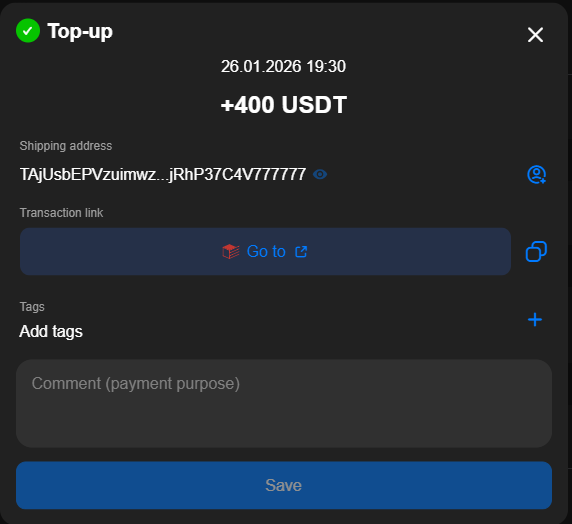
This link will open a blockchain explorer – for example, Tronscan.org if you sent USDT via TRC-20.
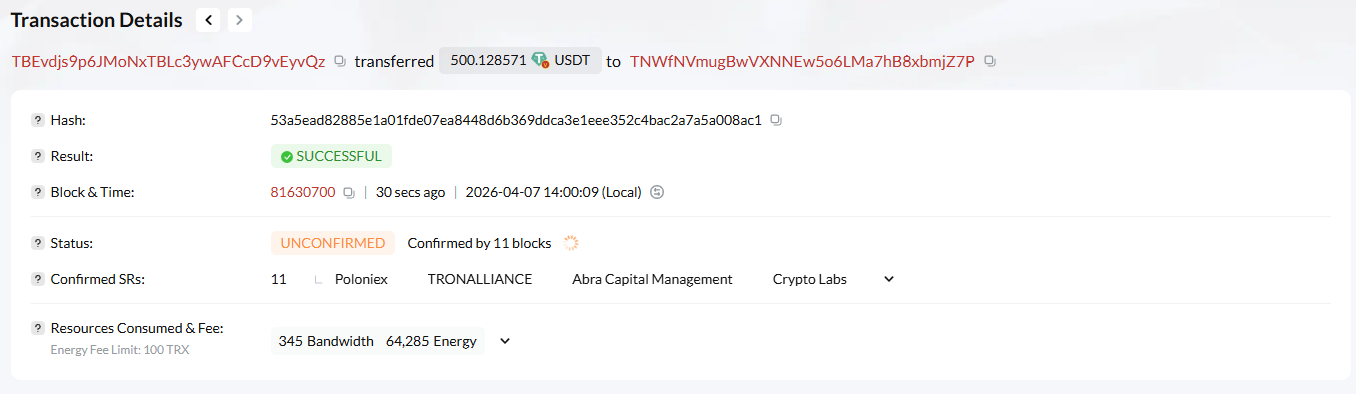
If the status shows "Success", the USDT has already been credited to the recipient's address.
If the status shows "Pending", the transfer is still being processed – wait for it to complete.
Delays are most often caused by network congestion. Crypto Office always routes transfers at maximum speed using optimized pathways.
Another common scenario: the sender confirms a completed transaction, but the funds don't appear in the recipient's balance. In most cases, this is a sender-side issue – usually an incorrect network selection for USDT.
To avoid problems when you send USDT to a Telegram wallet, follow these best practices:
- Always verify the wallet address multiple times before sending.
- Pay close attention to the network you select for USDT.
- Use the cross-chain send feature in Crypto Office for added flexibility.
How to Store USDT TRC-20 Safely After Transferring
Security is a fundamental part of working with any cryptocurrency, including USDT. A single mistake can result in lost funds or an incorrect transfer. Here are the key best practices:
- Use a strong password for wallet access – include uppercase letters, numbers, and special characters.
- Enable two-factor authentication (2FA) to add an extra confirmation step when sending USDT.
- Activate biometric protection on your device to prevent unauthorized access.
- Store your seed phrase offline. Never save it in notes, messaging apps, or cloud services.
- Always verify the recipient's USDT wallet address before sending. A single incorrect character will result in a permanent loss.
- Confirm the blockchain network before every transfer. An incorrect network selection will also result in lost funds.
- Only use trusted, reputable wallets and services to reduce the risk of fraud.
- Monitor your transaction history regularly to quickly identify any suspicious activity.
Finally, avoid suspicious services at all times. Do not click on unknown links, and never approve transactions if you're unsure of the source.
Conclusion
Telegram wallets make working with USDT significantly more convenient. Users can top up their balance, send USDT in Telegram directly in chats and groups, and reach the right contacts without complicated processes.
Crypto Office goes further than just transfers – it provides flexible tools for managing USDT, including an automatic cross-chain mechanism and access to exchange-level liquidity.
At the same time, it's essential to follow basic security practices. Verifying addresses, selecting the right network, monitoring fees, and protecting your wallet access are non-negotiable when working with digital assets.
Michael Turner knows his stuff when it comes to crypto and blockchain. He puts out content that's not only well-researched but also easy to understand, helping people get a handle on managing their digital assets.