

By 2026, keeping digital assets inside messaging apps isn’t just a niche idea anymore – it’s turning into a common practice. Telegram is playing a significant role in this change. Recent surveys show that about one in three Telegram users has some experience with cryptocurrencies. This guide will explain what a wallet on Telegram is, how the technology behind it works, and take you through each step to create your own Telegram wallet. We’ll also look at different options so you can pick the one that suits you best.
What Is a Telegram Wallet and How Does It Work
Understanding what is Telegram wallet starts with the infrastructure behind it. Telegram includes cryptocurrency features right in its interface, so managing digital assets is as simple as sending a message.
This is made possible by The Open Network (TON), a blockchain created to handle a large number of transactions efficiently. The TON system supports quick transactions, low costs, and consistent performance even when traffic is heavy. For crypto operations within Telegram, TON serves as the foundational settlement layer.
A Telegram wallet is essentially a bridge between the user and the blockchain. Here is how a typical transaction flows:
- The user initiates a transfer.
- The system constructs the transaction and broadcasts it to the blockchain.
- The network confirms the transaction.
- Data is recorded on-chain and the balance updates.
- The full transaction history remains accessible directly inside the app.
The result is a new model for interacting with crypto: Telegram becomes the simplest possible entry point to digital assets, and the wallet is the core element through which every interaction passes.
How to Create a Telegram Wallet via a Bot or Mini App
There are several approaches to how to open a Telegram wallet. The most common is through the messenger’s own interface. For example, Telegram’s official Wallet bot provides a baseline way to hold and transfer crypto. However, in 2026, more flexible infrastructure solutions have emerged that go well beyond simple storage.
One leading option is Crypto Office – a full-featured mini app inside Telegram. If you are wondering how to set up a Telegram wallet with professional-grade capabilities, Crypto Office covers the entire spectrum of crypto payment processing:
- Sending and receiving cryptocurrencies
- Fundraising and collections
- Built-in bookkeeping and accounting
- Transit wallets for separating fund flows
- Cross-chain swaps
- Automatic AML screening
- Integration with exchange liquidity and more
To begin, open Telegram and search for @officeapp. Launch the mini app and follow the instructions on the screen. Your wallet will be set up in seconds without any long verification process.
How to Use Your Telegram Wallet
Inside Crypto Office, users have access to storage, transfers, and crypto swaps. For example, to send cryptocurrency to another user:
- Launch the Crypto Office mini app and go to “Wallet.”
Select the token you want to send from your assets.
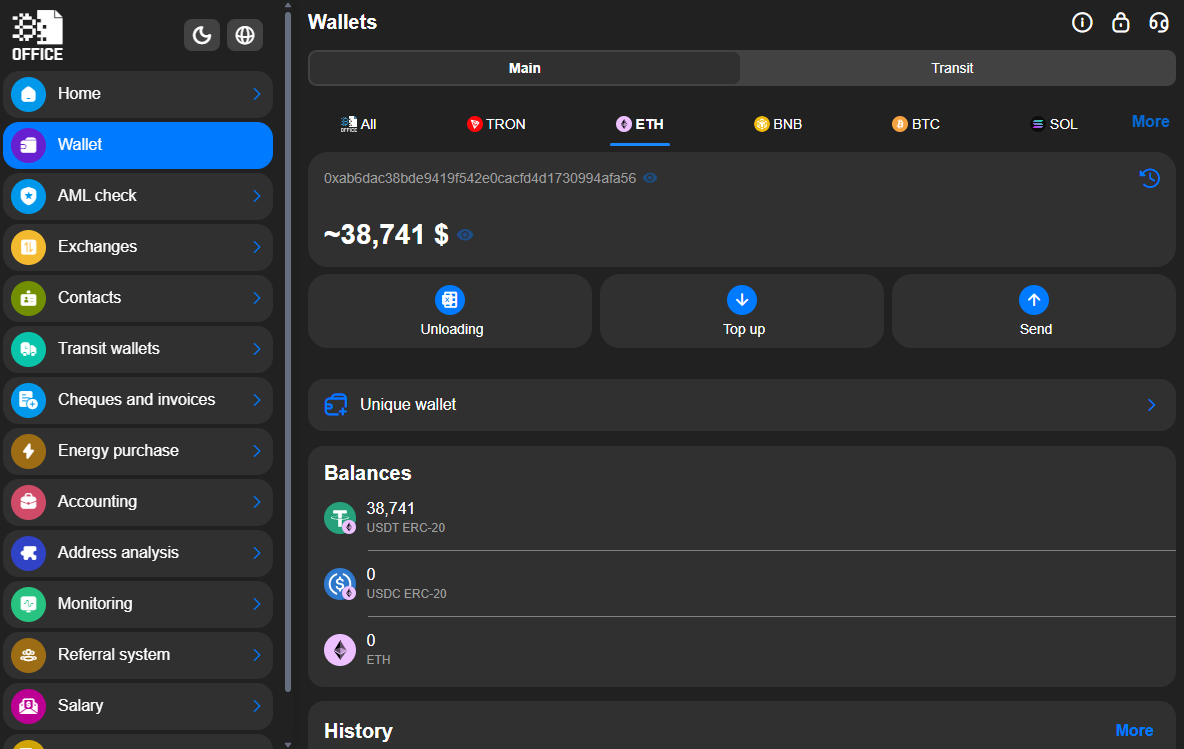
Tap “Send.”
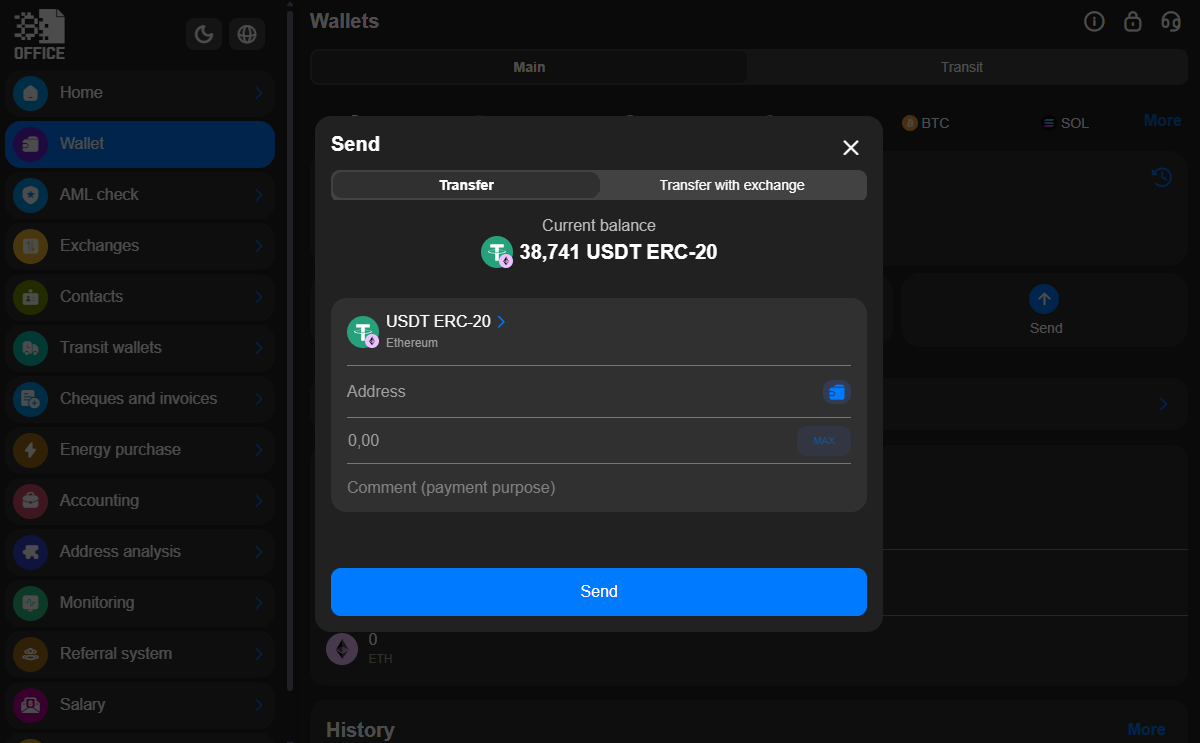
- Enter the recipient’s wallet address.
- Enter the transfer amount.
- Confirm the transaction.
Checking Balance and Transaction History
Keeping track of your funds is a fundamental part of using any crypto wallet. In Crypto Office, wallet analytics are integrated right into the interface. You can quickly check your current balance, see how it’s divided across different cryptocurrencies, and view live exchange rates all in one place. Full transaction history is stored in your account.
Crypto Office also offers a dedicated Wallet Monitoring feature, which lets you track balances across external addresses.
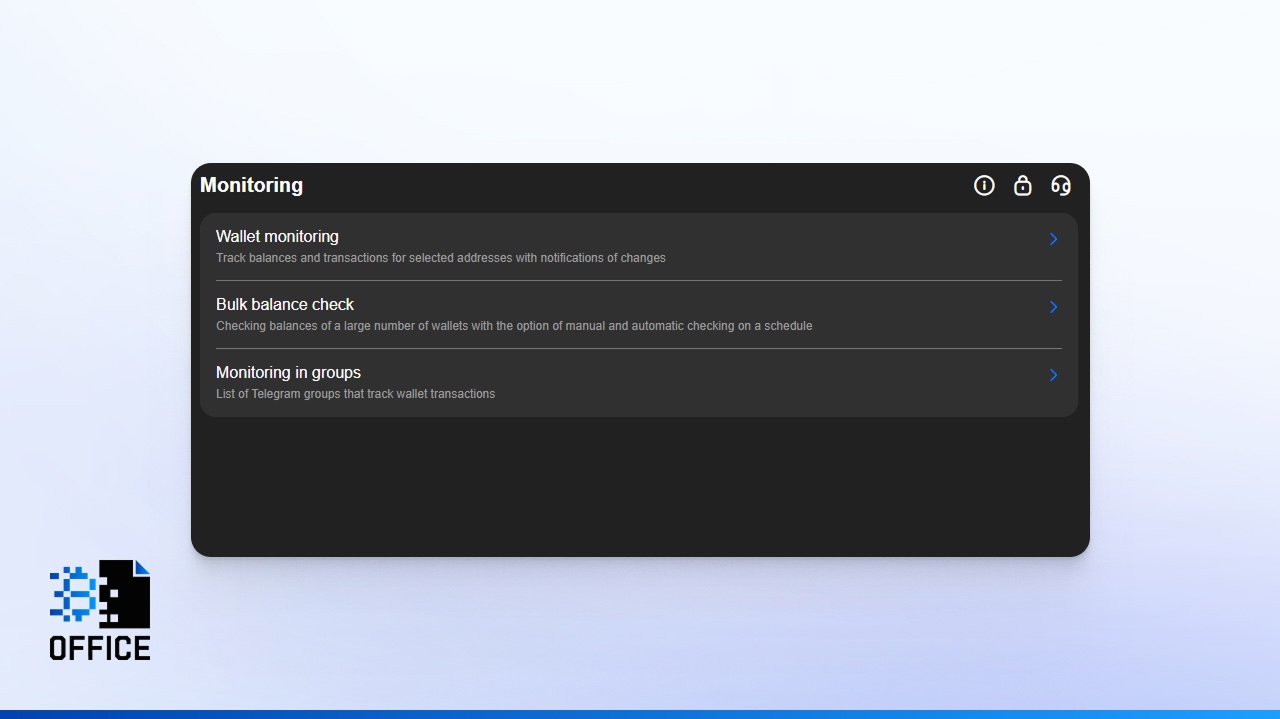
To set it up:
- Go to the “Monitoring” section.
- Select “Wallet Monitoring.”
- Choose the blockchain network for the address you want to track.
- Enter the wallet address.
- Filter by incoming, outgoing, or all transactions.
- Tap “Track.”
After that, you’ll get real-time notifications whenever there’s activity on the addresses you’ve selected. You can also upload a list of several wallet addresses at once and set a minimum transaction amount to trigger alerts. Once a transaction is confirmed on the blockchain, the app sends a notification straight to your chat.
Additionally, Crypto Office includes a reporting module. It lets you structure your transaction history over any selected period – ideal for tracking cash flow, monitoring balance dynamics, and accounting for network fees.
How to Share Your Wallet Address in Telegram
To receive or send crypto inside Telegram, you need to exchange wallet details. Every wallet corresponds to a blockchain address – transactions arrive at it and leave from it. There are three convenient ways to share your address.
Copy the address.
- Open Crypto Office.
- Select the cryptocurrency you want to receive.
- Tap “Deposit.”
- Copy the wallet address from the new screen.
You can paste this address into any chat or send it to any contact. The sender then uses it to initiate a transfer.
Important: Always match the address to the correct network. For example, a TON address cannot receive assets from a different blockchain. Sending funds to the wrong network may result in permanent loss.
QR code. In the deposit section, a QR code is displayed alongside the address. The sender can scan it to auto-fill the recipient details without typing anything manually.
Inline command. This is one of Telegram’s standout features for crypto usability. In Crypto Office, you can share your wallet address directly inside a conversation. To do so:
- Open a chat with the contact.
- Type the inline command @officeapp w in the message field.
Select the wallet and network from the list.
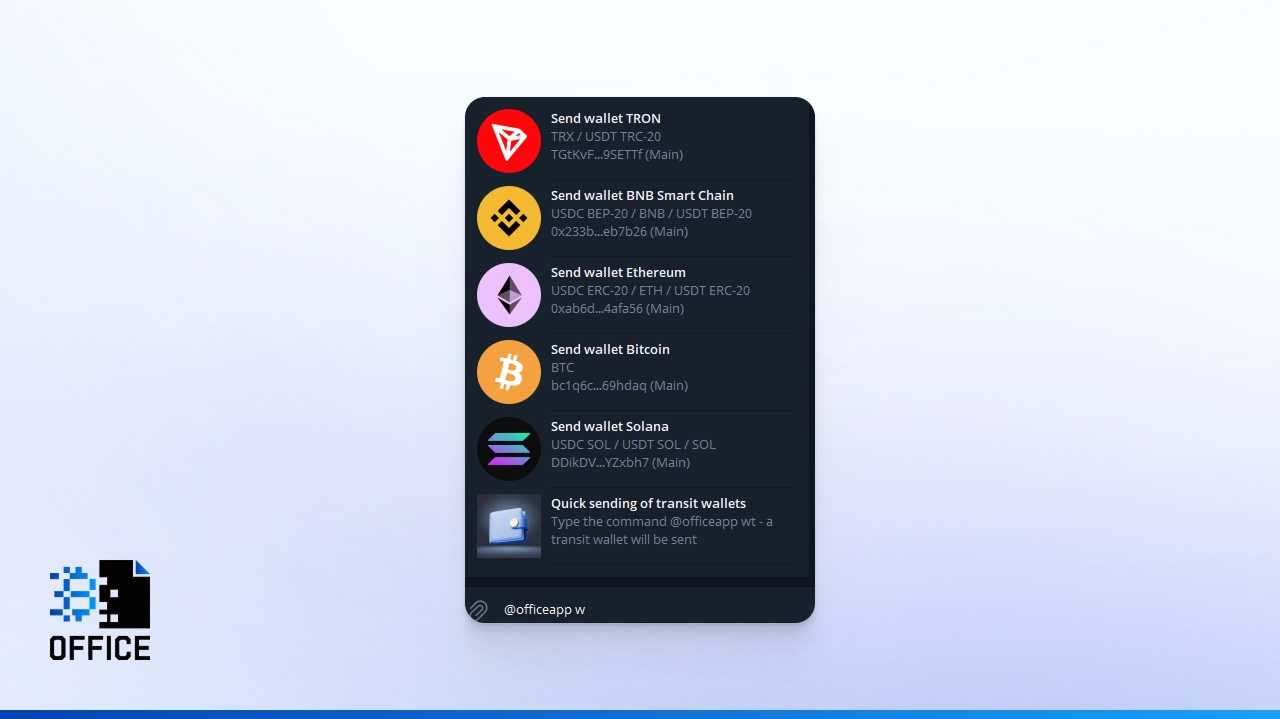
The recipient’s chat will display the wallet address, the token type and network, and a button to initiate a transfer immediately.
Transaction Fees in a Telegram Wallet
Every blockchain transaction requires a fee. This is a fundamental mechanism – without it, the network cannot function. Fees are paid to validators or miners who verify transactions and add them to the blockchain. When the network is busy, fees can increase, helping to manage which transactions get processed first and preventing the network from getting overloaded.
There are two layers of fees to be aware of:
Network fee (gas fee). This is the fee paid to the blockchain itself. It is calculated automatically and depends on the specific network – for example, TON or TRON.
Service fee. This is charged by the wallet application for using its infrastructure, for instance, for swapping cryptocurrencies within the app.
Crypto Office maintains some of the lowest service fees available. For swaps, the platform charges:
- 0.1% of the amount for stablecoins (USDT or USDC)
- 0.3% of the amount for other cryptocurrencies
Network fees are charged separately. They do not depend on the wallet or the Telegram app – they are calculated automatically at the moment of sending. In the TON network, fees are minimal. In TRON, the fee can be near zero with the right configuration. In other blockchains such as Ethereum, transfer costs can be considerably higher.
How to Reduce Transaction Costs
Some blockchains offer built-in mechanisms to lower fees. TRON, for example, uses a resource model. Instead of paying a direct fee, users can leverage the network’s “Energy” – a resource that covers the cost of sending USDT TRC-20.
Crypto Office gives users the ability to rent TRON Energy directly inside the app. This can cut the cost of sending USDT TRC-20 by up to 50%, making high-frequency transfers significantly more affordable.
Does a Telegram Wallet Require Verification?
KYC (Know Your Customer) verification is standard practice across the crypto industry. It is required to confirm a user’s identity and reduce fraud risk. Crypto services and exchanges must follow AML (Anti-Money Laundering) policies – a compliance framework that checks the origin of funds and helps prevent illegal activity.
Verification is typically required for:
- Increasing deposit and withdrawal limits
- Accessing P2P operations
- Using bank card integration
- Reducing the risk of transaction blocks
That said, KYC can be a friction point. Users must upload documents, wait for approval, and in some countries, access to fully verified services is restricted. This is why Telegram wallets generally take a hybrid approach – core features are available without verification, while advanced capabilities may require it.
In Crypto Office, no KYC verification is required at all. You get instant access to your crypto wallet and every feature the platform offers from the moment you launch the mini app.
Is It Safe to Use a Wallet in Telegram?
Security is the top priority in crypto, especially when funds are accessed through a messaging app. Most Telegram wallets are custodial – meaning the service manages the private keys and provides access to digital assets. This does not, however, mean reduced security.
Modern Telegram wallet applications use multi-layer protection:
- End-to-end data encryption
- Granular access control
- Two-factor authentication (2FA)
- Biometric access protection
- Automated AML screening
Crypto Office adds several tools that make it both flexible and more resilient.
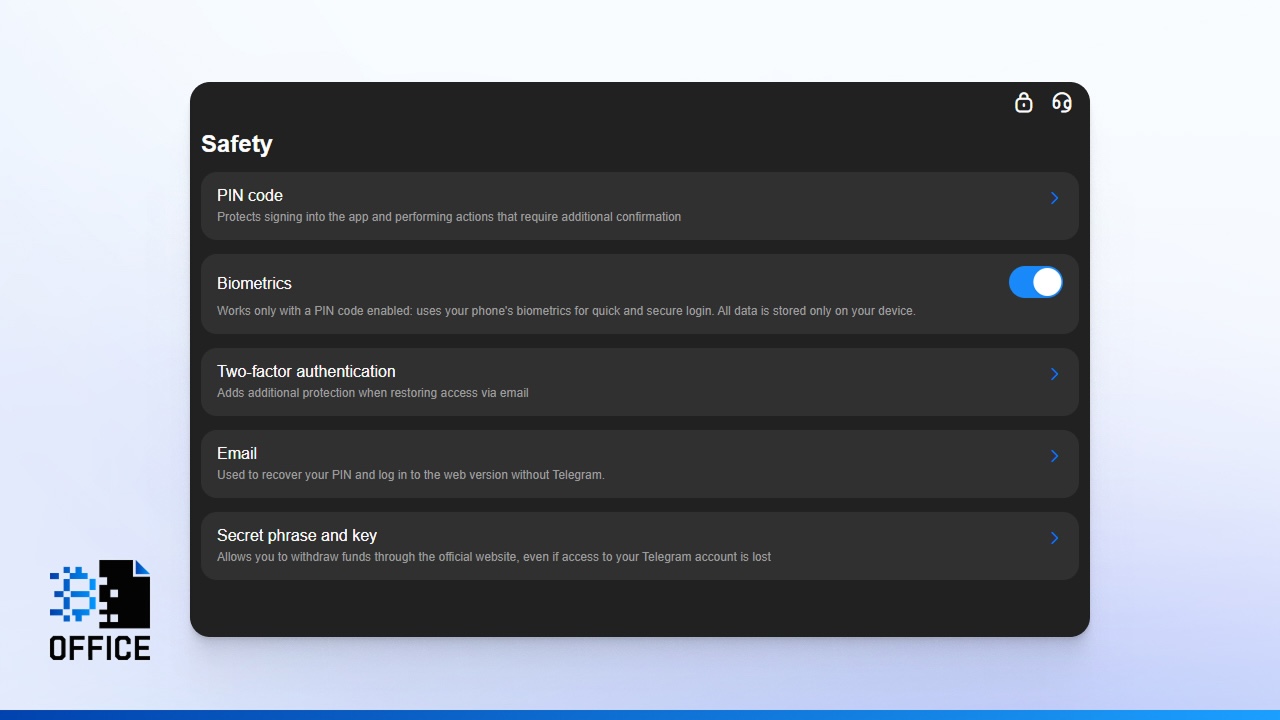
First, users can retrieve their secret recovery phrase at any time. This makes it possible to migrate all funds to a different wallet in an emergency – for instance, if access to the Telegram account is lost.
Second, transit wallets are available. This mechanism lets users separate fund flows across different counterparties, reducing exposure and risk.
Third, AML screening is built in. The system analyzes wallet addresses and incoming crypto by Risk Score, helping identify potentially dangerous transactions before they are processed. In an industry where fund freezes have become a serious problem, proactive screening significantly lowers that risk.
How to Set Up Two-Factor Authentication
Two-factor authentication is a critical security layer for any crypto wallet. It adds a second verification step both at login and when confirming transactions. Here is how to set up your Telegram wallet’s 2FA in Crypto Office:
- Go to your wallet settings.
- Select the “Security” section.
- Activate Two-Factor Authentication.
- Link your device or authenticator app (e.g., Google Authenticator).
Enable 2FA immediately after you create your account. Even if someone gains access to your Telegram account, they will not be able to manage your wallet without passing the authentication step.
Conclusion
A Telegram wallet represents a new level of interaction with cryptocurrency. The messenger transforms blockchain access into something as familiar as sending a text. You can check your balance, complete a transfer, or top up your account in a matter of seconds. At the same time, solutions like Crypto Office add flexibility, convenience, and professional-grade security to the equation. You get access to a wide range of crypto tools without any verification – while retaining full control over your funds.
Michael Turner knows his stuff when it comes to crypto and blockchain. He puts out content that's not only well-researched but also easy to understand, helping people get a handle on managing their digital assets.