

Thanks to its high liquidity and support across multiple networks, Tether remains one of the most in-demand crypto assets. USDT's current market capitalization exceeds $180 billion, with a daily trading volume of more than $40 billion. Like other cryptocurrencies, USDT is used for a variety of purposes. The token can be stored, exchanged, sent to other users, or used to pay for goods and services. That's why choosing a reliable solution for managing USDT matters so much.
In this article, we'll explain how to create a USDT wallet and why you need one. We'll also cover which wallet to choose and what to pay attention to along the way.
What Is a Crypto Wallet With USDT Support?
A USDT wallet is an app or service that supports cryptocurrencies, including stablecoins. It lets you store, receive, and send Tether. The wallet's interface also shows your balance and transaction history. Every USDT wallet generates a public address, which you can share with someone else so they can send you funds.
If you've ever wondered what is a USDT wallet exactly, here's the key detail to understand: the USDT tokens themselves don't actually sit inside the wallet. They live on the blockchain. The wallet simply gives you a way to manage them. Because of this, you can access the same address from another wallet compatible with USDT – all you need is the seed phrase.
Custodial or Non-Custodial: Which Should You Choose?
Before you create a wallet for USDT, it's worth understanding that wallets generally fall into two categories. Many beginners first ask themselves what is USDT wallet ownership actually like in practice – and the answer depends heavily on which of these two types you pick.
A custodial wallet is one where the provider holds the private keys and seed phrase on your behalf. This model is used by most centralized platforms and exchanges. If you lose your account password, recovering access to your funds can be difficult – you'd need to contact support and wait for a resolution. This option suits people who value convenience and don't want to deal with technical details.
A non-custodial USDT wallet works differently. Only the owner holds the private key and seed phrase, and no one else can restore access without this data. That means the responsibility for storing USDT rests entirely with the user.
Each type has its own advantages. Custodial services are easier for beginners. Non-custodial wallets give you full control over your funds and don't require trusting a third party. If you plan to make frequent small transfers, a custodial service works well. If your main goal is securely storing and managing a large amount of capital, a non-custodial crypto wallet is the better choice.
Some custodial-based solutions offer a middle ground. For example, Crypto Office lets you use your seed phrase in an emergency to withdraw funds to another wallet. The service also has an option to transfer your profile to a new one if you lose access to your Telegram account or switch to a different one.
How to Open a Crypto Wallet for USDT – Step-by-Step Instructions
You can get a USDT wallet and start using it within seconds. The main thing is to choose a trustworthy service with a solid reputation, a simple interface, and support for every Tether network.
For example, you can use the popular Crypto Office wallet. It's a Telegram mini-app that lets you securely store USDT, send it, and exchange assets across different blockchains.
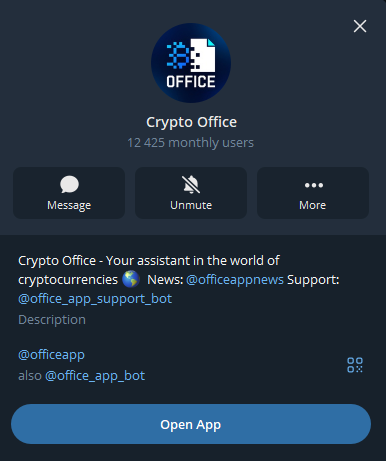
Step 1. Launch the Crypto Office Wallet
Search for “Crypto Office” in Telegram, or follow this link: https://t.me/officeapp.
Step 2. Create Your Account With the Service
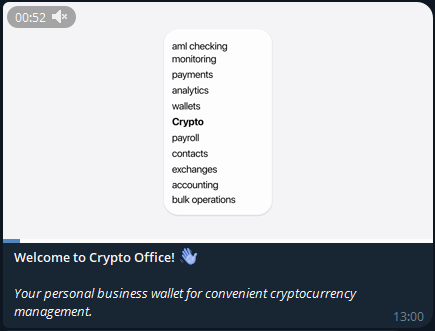
Send the “/start” command in the bot's chat. Your wallet will be created instantly – this really is how to create USDT wallet access through Crypto Office in a single step.
Step 3. Start Using USDT
The service automatically creates USDT wallets that support the ERC20, TRC20, BEP20, and SOL standards.
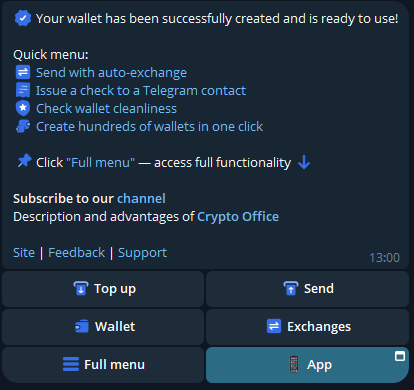
The best USDT wallet on Telegram, ready in two clicks. Use Crypto Office to store and process USDT payments, along with other cryptocurrencies.

Do You Need o Choose a Network for Your USDT Wallet?
USDT tokens are issued on several networks:
- TRON (TRC20)
- Ethereum (ERC20)
- BNB Smart Chain (BEP20)
- Solana (SPL)
Each network has its own characteristics. The blockchain you choose affects the transaction fee, the processing time, and compatibility. If you send funds over one network while the recipient's address belongs to another, the transfer will fail and the tokens will be lost. That's why, before every transaction, it's worth double-checking that both sides are using the same standard.
This often raises another common question – what is a TRC20 wallet, and how is it different from a wallet built for ERC20 or BEP20? In short, a TRC20 wallet is simply a USDT wallet configured to run on the TRON network, which is known for its low fees and fast confirmation times.
It's a lot more convenient to use a service that works with several networks at once. This is exactly how Crypto Office is built. As soon as you create a wallet, you get access to USDT across multiple networks. This makes working with the stablecoin noticeably simpler – you can receive transfers, send funds, and manage your assets without switching between different apps.
Another advantage of Crypto Office is its cross-chain functionality. If you need to convert tokens from one blockchain to another, you can do this in the “Exchange” section. This format saves time by removing the need to look for separate blockchain bridges. As a result, this USDT wallet remains a versatile tool both for beginners and for users who regularly work with digital assets.
How to Top Up Your USDT Wallet and Check Your Balance
Topping up your wallet in Crypto Office is available right away. To do this:
Open the “Wallet” section.
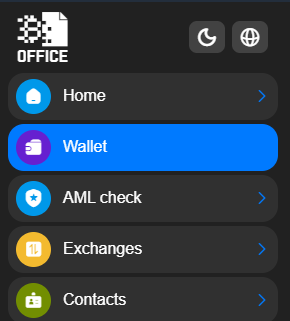
Choose a network for USDT (ETH, TRON, BNB, or SOL).
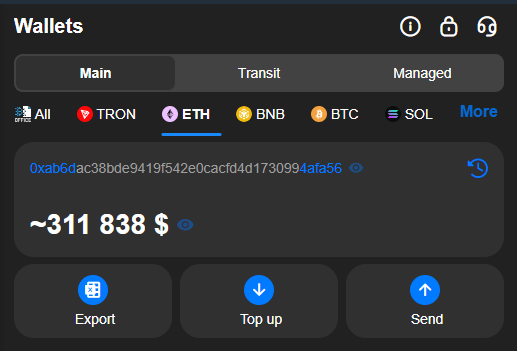
Tap “Top Up.”
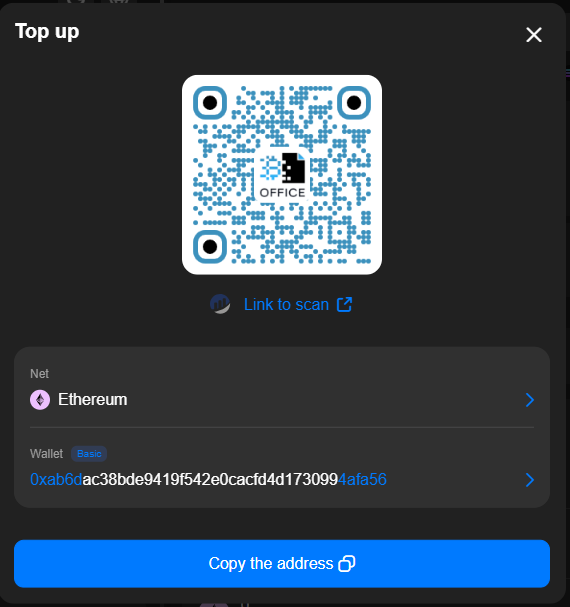
- Copy the address you receive.
- Send USDT to this wallet address.
Once the transfer is confirmed on the blockchain, the funds will appear in your wallet balance.
You can also receive USDT from other users at your address using an inline command. To do this:
- Open a chat or group in Telegram.
Type the command “@officeapp w”.
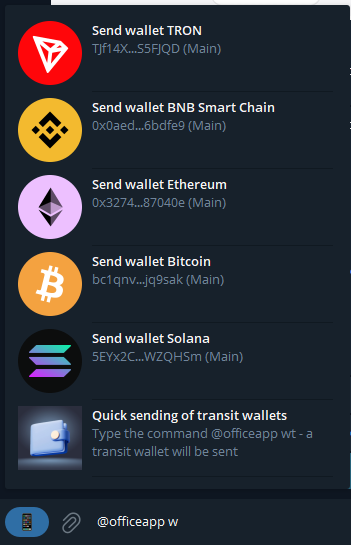
From the menu, select “Send wallet XXX.”
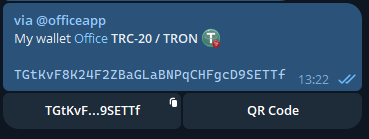
After the payment details are sent, the recipient will be able to transfer stablecoins to your wallet.
How to View Your Wallet Address
To do this, in the “Wallet” section:
- Select USDT.
- Specify the network you want to receive the transfer on: TRON (TRC20), Ethereum (ERC20), or BNB (BEP20).
The service will display your wallet address and a QR code. This is essentially how to get USDT wallet address for a specific network – provide it whenever you withdraw USDT from an exchange, another wallet, or an exchange service.
Where to View Your Transaction History
After receiving or sending funds, your USDT wallet balance updates automatically. Every transaction is saved in your transaction history. For each one, you can see the date, amount, status, and the network the transfer went through. If you need more detail, you can open it in a blockchain explorer. This lets you confirm the transaction and make sure the funds were successfully sent or received.
This approach makes working with cryptocurrency much clearer. You always see the state of your account, can track the movement of funds, and can quickly check any USDT operation.
Mistakes When Creating a USDT Wallet and How to Avoid Them
You can create a USDT wallet in a few seconds. But mistakes usually happen later, during transfers – often due to carelessness or not fully understanding how the blockchain works.
The most common mistake is choosing the wrong network. For example, an address might be created on the TRC20 network, while the transfer is sent through ERC20. In that case, the funds won't reach the recipient. So before every transaction, always check that the sender's and recipient's networks match.
Knowing how to create wallet address for USDT is only half the job – keeping access to that wallet safe matters just as much. Be sure to write down your seed phrase right after creating your USDT wallet. Store it somewhere safe and never share it with anyone. Also, don't keep it in your phone's notes app or in cloud storage.
Another common mistake involves the recipient's address. Sometimes a user accidentally copies the wrong one. There's also malware that can quietly swap the address in your clipboard. That's why, before sending, always double-check the first and last characters of the address. It only takes a few seconds but can save your tokens.
In Crypto Office, the wallet automatically highlights the first and last characters of an address, which makes spotting a substitution much easier.
Don't send a large amount right away. Start with a small test transfer first. If it goes through successfully, you can send the rest of the funds. This simple step helps avoid mistakes and makes working with cryptocurrency much safer.
Conclusion
USDT is used for storing funds, sending money, and making payments. To use it safely, it's important to choose a reliable wallet and understand how it works. Now you know how to create USDT wallet access from scratch and why choosing the right network matters. When picking a service, don't focus on security alone – other factors matter too: support for popular networks, a convenient interface, regular updates, and features that make working with cryptocurrency simpler and more comfortable.
Journalist and editor specializing in crypto markets and blockchain infrastructure, covering regulatory shifts, institutional adoption, and the evolution of Web3 protocols.