

Sending cryptocurrency may look complicated at first. Every transaction is processed by the blockchain, recorded permanently, and impossible to reverse. Any mistake can lead to losing funds. But when you understand the basics of sending crypto, transferring digital assets to another person, to your own wallet, or to an exchange becomes much easier.
This guide explains in detail how to transfer crypto correctly, safely, and without unnecessary risks.
What You Need to Transfer Cryptocurrency
To begin, you need the recipient’s wallet address – a public identifier where the blockchain will deliver the tokens. Each address is unique, and it must be copied precisely. Any error may result in irreversible loss of funds.
You also need a wallet or another source of funds. Wallets may be hot or cold (hardware), and they come in mobile, web, or desktop formats. The user selects the option depending on convenience and security needs. Among modern and secure solutions, Crypto Office in Telegram stands out.
The sender's wallet must have a sufficient balance to cover both the transfer amount and the blockchain fee. Fees vary across networks. The confirmation time also differs – from a few seconds to several minutes, depending on network load. This directly impacts how long does it take to transfer crypto to wallet in each specific chain.
Why Transfers Through Crypto Office Are Convenient
Many users want to understand not just how to send crypto to someone, but how to do it safely and quickly. Crypto Office simplifies the process and reduces the chance of mistakes.
The service makes crypto operations more transparent: the system verifies all details before the transfer and performs an AML check to protect users from potential risks.
Key advantages:
- Convenient single and mass transfers – sending crypto to hundreds of addresses at once.
- Automatic AML screening of wallets and outgoing assets.
- Fast transaction processing.
- Clear display of blockchain fees before confirming the operation.
- Detailed reporting and notifications after the transaction is validated.
More features of Crypto Office are available here:
https://crypto-office.com/mass-crypto-payments
How to Send Crypto Through Crypto Office
Crypto Office makes transfers simple even for beginners. To complete a transaction:
- Open the Crypto Office Mini-App in Telegram.
Go to the Wallet section.
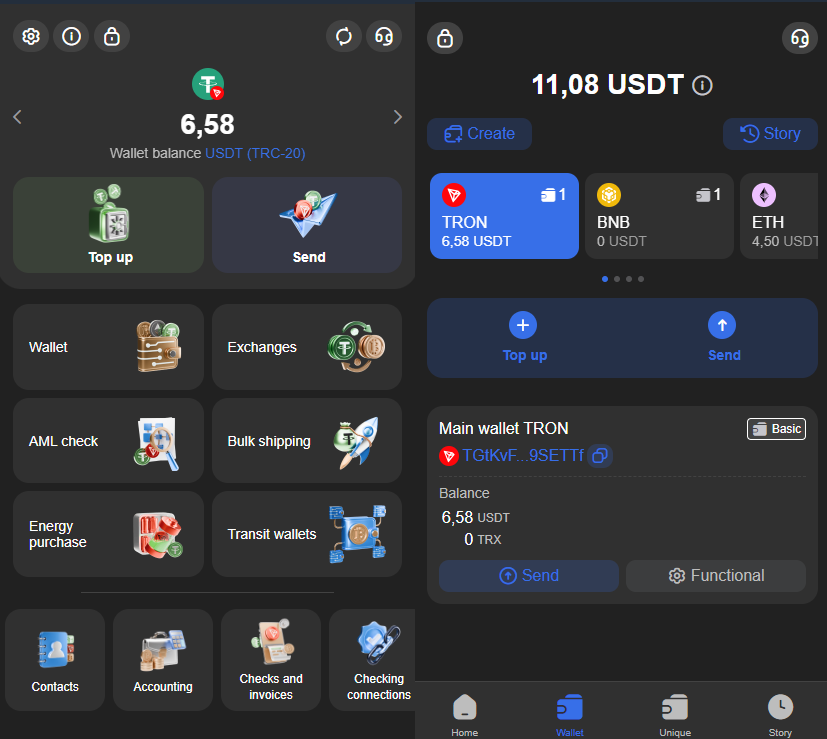
- Tap Send.
- Choose the token – for example, USDT TRC-20.
Enter or paste the recipient’s wallet address, or pick a saved contact.
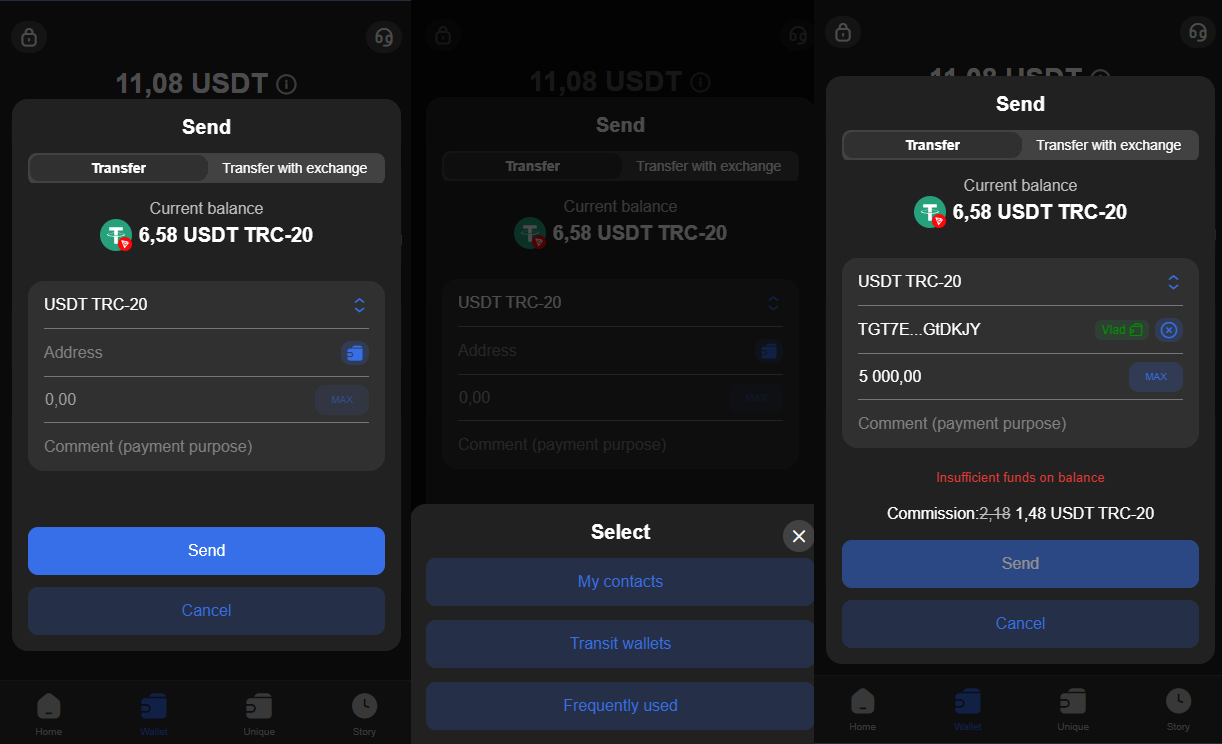
- Specify the amount.
- Confirm the transfer.
The system processes the transaction quickly and sends a notification once it’s confirmed.
How to Transfer Crypto From Bybit or Other Exchanges
For many users, transferring funds from a centralized exchange is easier than sending from a personal wallet. The process is similar to a standard withdrawal, but requires extra attention.
As with any exchange, you must create an account on Bybit, complete KYC, and deposit funds.
Then:
- Open your Bybit profile.
Go to Assets and choose Withdraw.
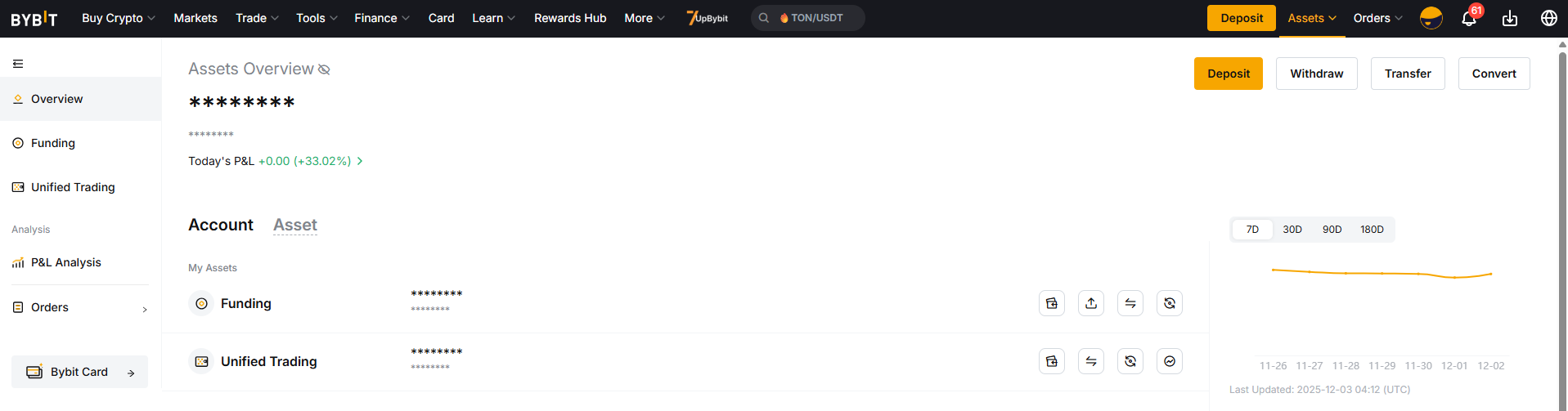
- Select the currency – for example, USDT.
- Enter the recipient’s wallet address.
- Select the correct network: TRC-20, ERC-20, or BEP-20.
Enter the amount – the exchange will display the fee.
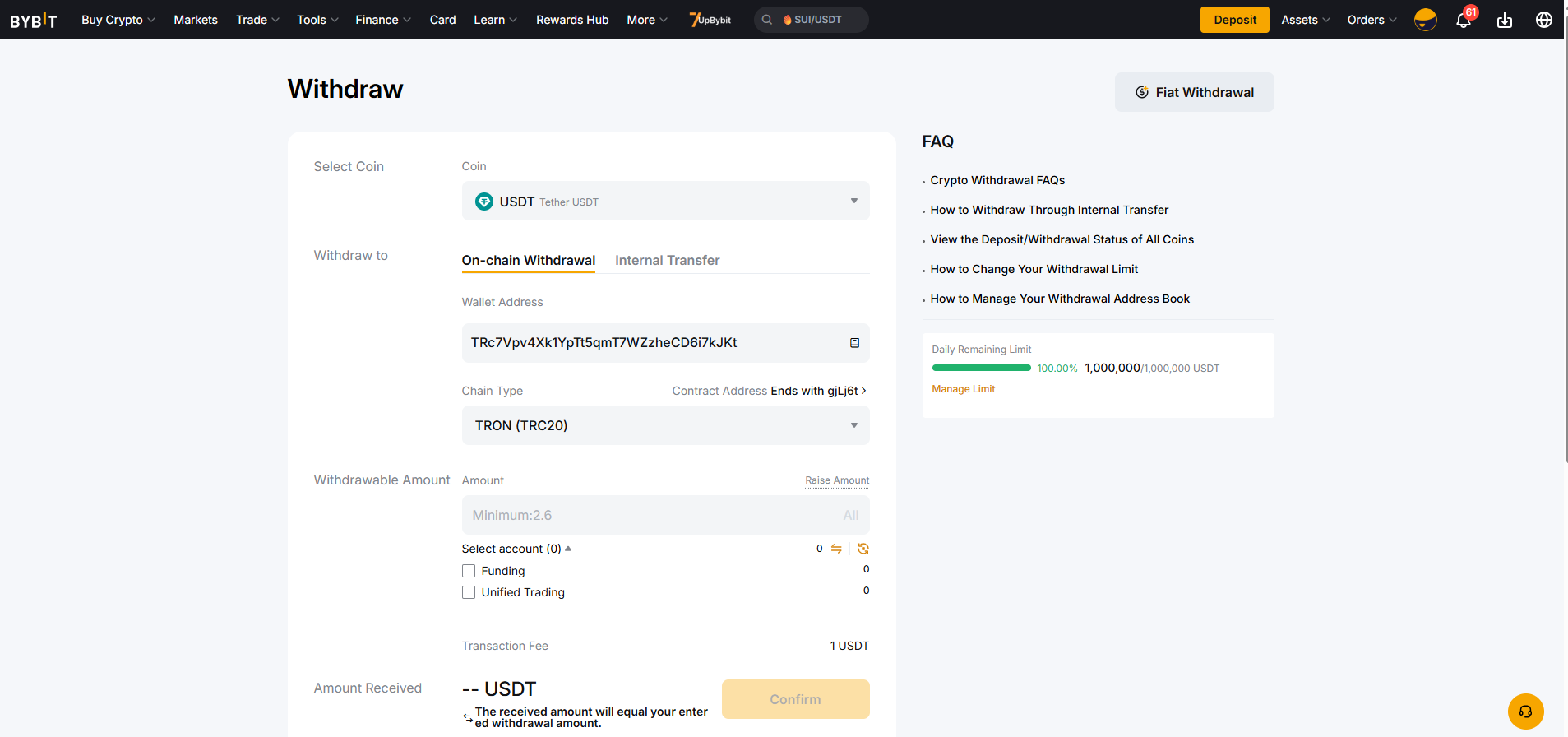
- Confirm the withdrawal.
- Wait for blockchain validation.
This method works similarly on all exchanges – the interface may differ, but the logic of how to send crypto to someone remains the same.
Sending Cryptocurrency with Automatic Exchange
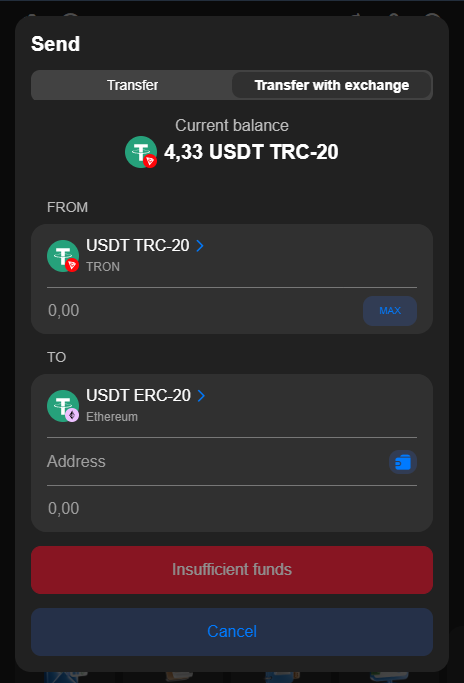
Crypto Office has implemented a cross-chain transfer mechanism with automatic asset conversion across different blockchains. The user selects the source cryptocurrency and the withdrawal network, specifies the recipient’s address and the target network for receiving funds. The service automatically performs the swap and delivers the selected asset in the required format.
How it works in practice:
- The sender selects, for example, USDT on the TRC-20 network.
- Specifies the recipient’s network and token type, for example, USDT ERC-20.
- The system locks in the exchange rate and performs the conversion within the service infrastructure.
The recipient receives the target token in the specified network.
As a result, the sender does not need to:
- Search for third-party exchangers or crypto bridges;
- Execute multiple transactions;
- Take on additional operational risks.
The key feature of exchange-enabled transfers in Crypto Office is that the recipient receives exchange-listed cryptocurrency. This means:
- The asset complies with the standards of centralized trading platforms;
- The likelihood of interacting with illiquid or questionable contracts is minimized;
- The overall level of security for storing and further using funds is increased.
Transaction Fees for Sending Cryptocurrency
The cost of how to transfer crypto depends on the blockchain and current network load. Some networks have predictable and fixed fees (TRON), while others vary depending on congestion (Ethereum, Bitcoin). Certain wallets or services may also charge platform fees.
Crypto Office helps reduce costs when sending USDT TRC-20 by using TRON Energy rental. This significantly lowers the fee and makes sending crypto more efficient.
How Long Does It Take to Transfer Crypto to Wallet?
The time it takes to confirm a transaction varies across blockchains – a key factor when users ask how long does it take to transfer crypto to wallet. Fast networks like TRON or Solana validate operations within seconds. Ethereum and Bitcoin may require several minutes, especially during high network load or gas wars.
Average confirmation times:
| Network | Average Time |
|---|---|
| Bitcoin | 10–60 minutes |
| Ethereum | 30 seconds – 10 minutes |
| TRON (TRC20) | 5–60 seconds |
| Binance Smart Chain | 5–30 seconds |
| Litecoin | 2–10 minutes |
| Solana | 1–20 seconds |
What Makes Transfers of Different Cryptocurrencies Unique
The core logic of sending crypto is similar across blockchains. But the details differ:
- Bitcoin addresses start with 1, 3, bc1q, or bc1p.
- Ethereum addresses start with 0x.
- TRON addresses start with T.
You cannot send tokens to an incompatible address format. Doing so may lead to permanent loss of funds.
Blockchains also differ in fee logic and error-handling:
- In Ethereum, users can raise the gas fee to speed up a delayed transaction.
- In TRON, fees can be covered with Energy or Bandwidth instead of TRX.
- In Bitcoin, Replace-by-Fee (RBF) can accelerate a stuck transaction.
Speed differences also affect how to transfer crypto to a wallet efficiently:
- Bitcoin: 3–7 TPS
- Ethereum: up to 24,000 TPS
- TRON: 2,000+ TPS
- Solana: up to 65,000 TPS
How to Avoid Mistakes When Sending Crypto
Errors happen even to experienced users, especially when they rush. Key risks include:
Mistake #1 – Choosing the Wrong Network
The most common issue: sending USDT via TRC-20 while the recipient expects ERC-20. This misalignment may cause irreversible loss of funds.
Always confirm the network before sending.
Mistake #2 – Incorrect Wallet Address
Typing an address manually is extremely risky. Even one missing character can redirect funds to the wrong wallet.
Always copy and double-check the address before confirming.
Mistake #3 – Incorrect Fee Calculation
Low fees may delay the transaction, while some networks require fixed fees. Make sure you have enough balance to cover the operation – a critical part of understanding how to send crypto safely.
Conclusion
Moving crypto becomes simple once you get the hang of blockchains, networks, fees, and addresses. Plan your transactions carefully to avoid losing money.
Take your time. Check the network, token, address, and any limits twice. Keep your private info safe, and use reliable services like Crypto Office. If you do these things, sending and getting crypto is simple and safe. It doesn't matter if you want to send crypto anonymously, send it to a friend, or just get some in your wallet.
Michael Turner knows his stuff when it comes to crypto and blockchain. He puts out content that's not only well-researched but also easy to understand, helping people get a handle on managing their digital assets.