

Ethereum remains a cornerstone of the crypto market and the second-largest cryptocurrency by Ethereum is still a big deal in the crypto world as the second-biggest cryptocurrency by market value. The Ethereum network handles about 3 million transactions each day, and over 800,000 ETH addresses are actively used.
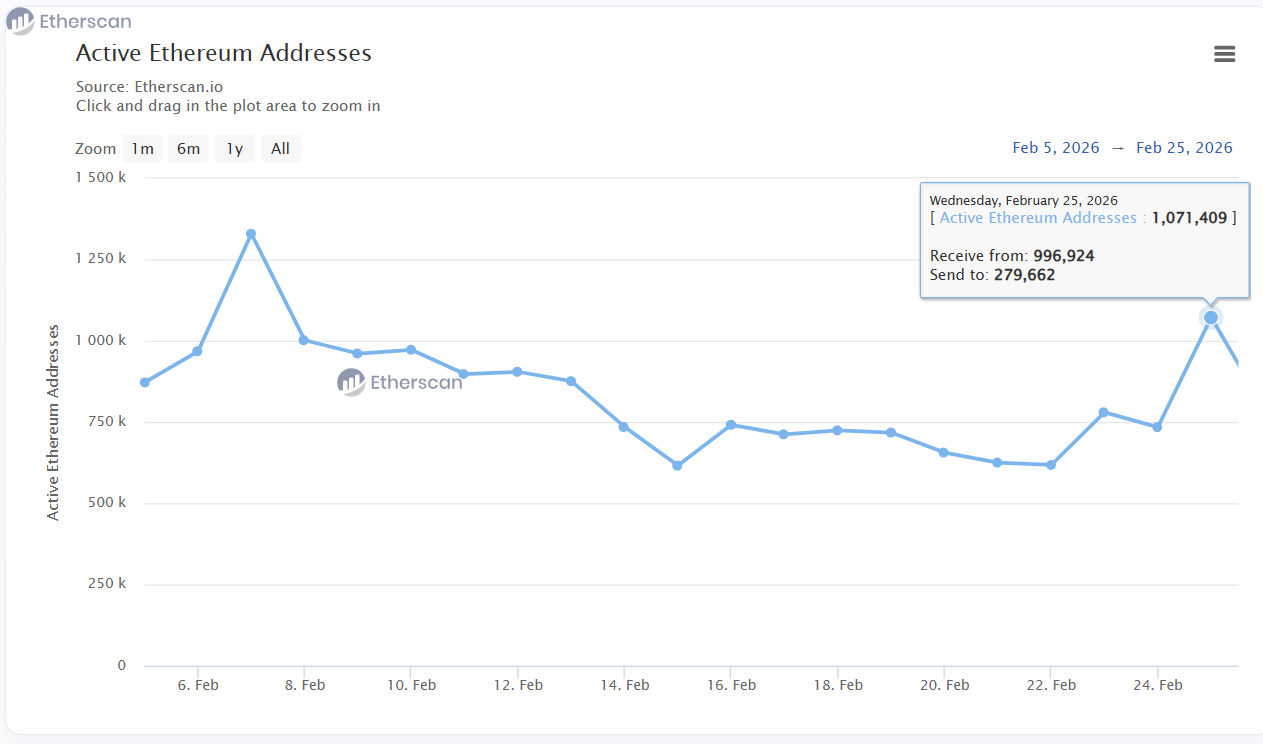
This shows ETH is commonly used for payments, DeFi, and everyday transfers.
In this guide, we'll cover everything you need to know about how to send Ethereum in 2026 – from understanding how transactions work to calculating fees and choosing the right wallet.
What Is Ethereum and How Does It Work
Ethereum is a decentralized blockchain that allows smart contracts and acts as a base for DeFi apps, NFTs, and other decentralized services. Before any transaction is added to a block, it has to be checked.
Ethereum uses a Proof-of-Stake (PoS) system, meaning validators are in charge of confirming operations. They check each transaction and add new blocks to the chain.
When you make a transfer, the transaction is created and signed in your wallet with a private key. The transaction data is then sent to the network, where validators check that it's correct before adding it to a block.
Every transaction is assigned a unique hash. You can check the hash of any ETH operation in the blockchain explorer at Etherscan.
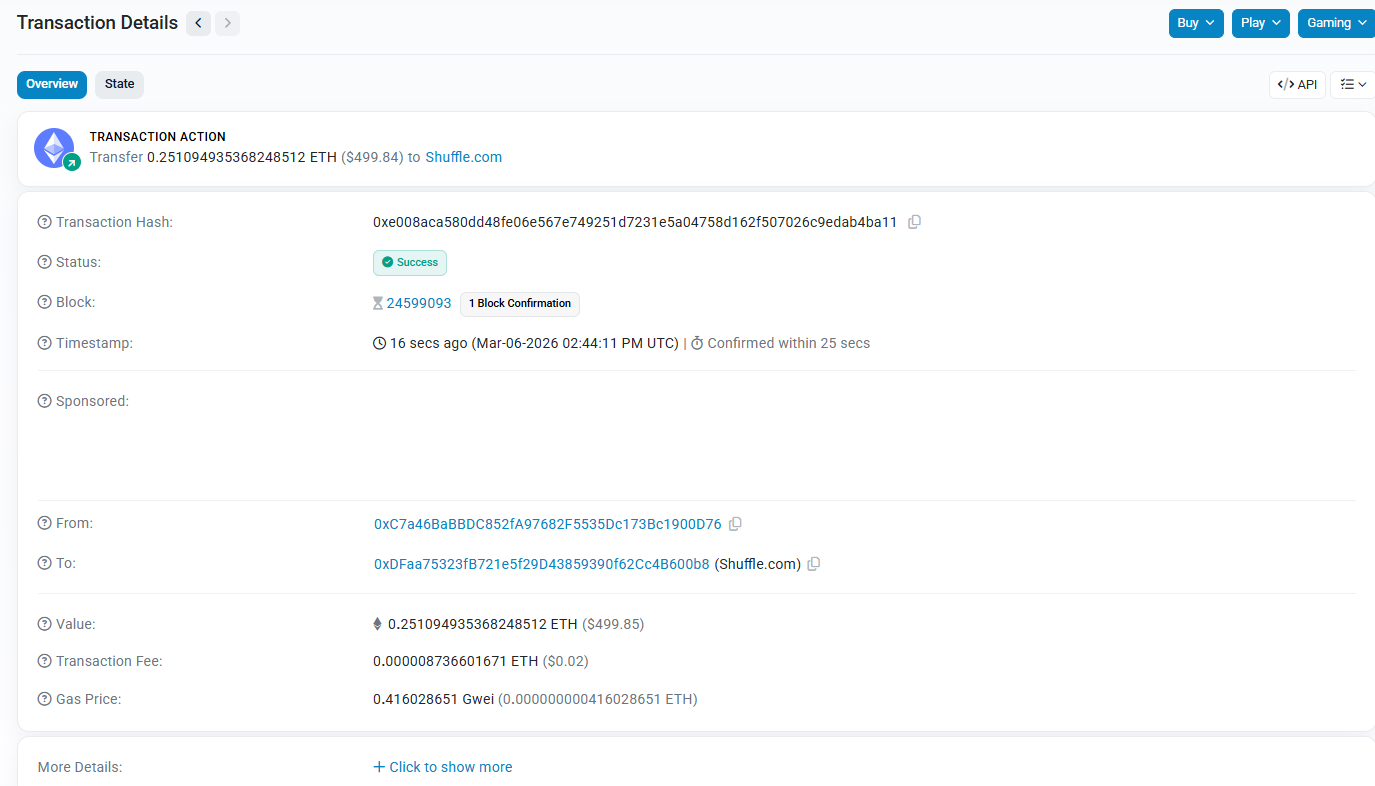
The explorer shows:
- Transaction status
- Transfer amount
- Number of confirmations
- Fee amount
- Exact time of block inclusion
Ethereum fees, paid in ETH, cover the computing power the blockchain uses. When the network's busy, each transaction costs more.
How to Send Ethereum: Step-by-Step Guide
Knowing how to send Ethereum from one wallet to another is a basic skill for anyone using cryptocurrency. ETH is not just an asset; it's also the fuel for the Ethereum network, paying for fees, smart contract actions, and token transfers.
Here’s how ETH and ERC-20 token transfers work:
Step 1. Choose a wallet. For this example, we'll use Crypto Office – a business wallet mini-app in Telegram that lets you perform ETH operations without complex setup.
Step 2. Select "ETH" from your assets.
Step 3. Tap "Send."
Step 4. Choose "ETH" from the token list.
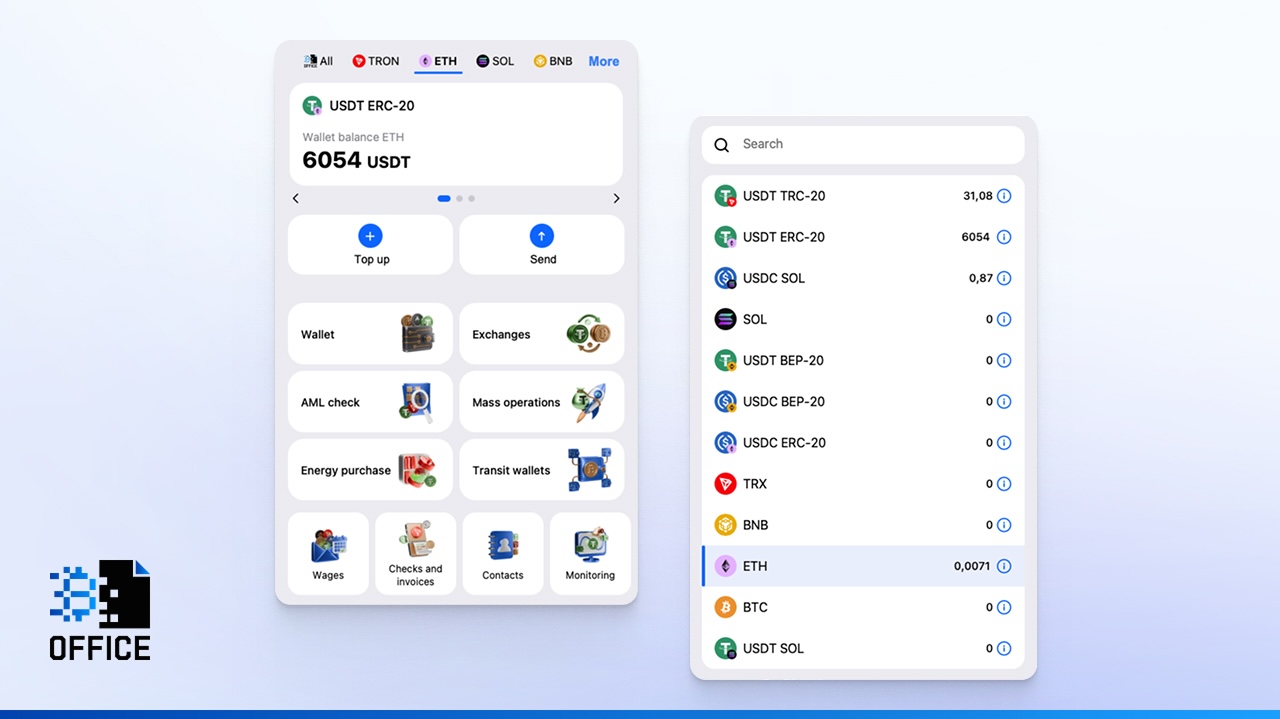
Step 5. Enter the amount and the recipient's ETH address. Important: if you enter a wallet address from the wrong network, funds will be lost. Always double-check the destination address before proceeding.
Step 6. Confirm the transfer.
Crypto Office displays the network fee before you confirm, so there are no surprises.
How to send Ethereum to someone using USDT ERC-20 instead of ETH? The process is identical. Go to your USDT ERC-20, hit Send, and enter the recipient's Ethereum address, then send the amount you want.
USDT on the Ethereum Network (ERC-20)
USDT is a stablecoin that mirrors the value of the US dollar. On Ethereum, it's created using the ERC-20 token type.
ERC-20 is a technical standard that defines the rules for token creation and transfer. Because of this standard, any compatible wallet can work with USDT out of the box.
When a user sends USDT ERC-20, a smart contract is triggered: it records the transaction and updates balances. Knowing how to send USDT on Ethereum network is slightly different from sending ETH directly. ERC-20 transfers need more processing power, so the gas fees are usually higher than a simple ETH transfer.
Here are the main things that set ERC-20 and TRC-20 apart:
- ERC-20 only works on the Ethereum blockchain. TRC-20 is on the TRON blockchain, where transfers are much faster and cheaper.
- The Ethereum network works well with DeFi protocols.
- TRC-20 is used more for regular person-to-person transfers and payments to other countries.
Ethereum Gas Fees: How They're Calculated and What Affects Them
How much does it cost to send Ethereum? It depends on current network conditions.
The Ethereum fee is the payment for executing your transaction on the network. Users who pay fees help keep the blockchain running correctly. Gas tokens collected don't go to any single entity – they're distributed among validators as rewards.
In Ethereum, fees are calculated in Gas – the unit of computational work required for operations. A typical ETH transfer uses 21,000 units of Gas. Here's how to figure out the total cost:
Gas used × (Base fee + Priority tip)
The base fee is burned by the network, while the priority tip goes to the validator.
This is why the final fee in Ethereum can vary. Some wallets offer speed modes:
- Slow – waits for a gas price lower than the current average
- Market – pays the current market gas price
- Aggressive – pays above-market to prioritize your transaction
If you're not in a hurry, the "Market" mode is usually the right choice. Setting too low a fee is risky – your transaction may get stuck in the pending queue until the network frees up.
One important note: if you're sending USDT ERC-20, the fee is still charged in ETH. This is a common mistake beginners make – having USDT but no ETH in the wallet to pay for gas.
How Long Does an Ethereum Transfer Take?
A frequent concern for new users is how long does Ethereum take to send. The answer depends on network load and the fee you've set.
First, a transaction is broadcast to the network. Then validators pick it up, and only after that it gets included in a block and receives a confirmation. Under normal conditions, how long does it take to send Ethereum comes down to just a few minutes. When the network's busy, though, you might have to wait hours.
To understand how long does it take for ETH to transfer more precisely, it helps to know how confirmation modes work. Wallets like MetaMask let users configure transaction priority with three speed options:
- Slow – waits for a gas price below the current average
- Market – pays the current market rate for gas
- Aggressive – pays above the market rate to jump ahead in the queue
In practice, how long ETH transfer takes under the "Market" mode is typically 15-30 seconds to a few minutes. The "Aggressive" mode can reduce this to under a minute. The "Slow" mode might take 10-30 minutes, possibly longer when things are busy.
Ethereum typically adds a new block about every 12 seconds. A standard transfer is considered final after 12-30 confirmations. So when asking how long does it take to transfer ETH under normal conditions – the realistic answer is 1 to 5 minutes.
If your transaction is "Pending", it means the network hasn't confirmed it yet. Just sit tight until the status changes. To speed things up, try raising the gas fee or changing to "Market" or "Aggressive" mode in your wallet.
How to Transfer Ethereum Between Different Networks
Sometimes, people might want to get ETH tokens on a different blockchain. Like Arbitrum or Optimism or move their assets back. This is known as a cross-chain transfer and usually needs a cross-chain bridge to work.
Why do users move ETH between networks? The reason is straightforward. Different chains have different fees, speeds, and use cases. The main Ethereum network can have higher fees, while Layer 2 blockchains are significantly cheaper and faster. That's why simply "sending crypto to an ETH address" isn't always the right move – you need to know which network the recipient is actually on.
A cross-chain transfer works differently from a standard transaction. You exchange ETH through a bridge, which locks or burns tokens on one network and issues an equivalent on the other.

Cross-Chain Sending: Swap Assets During the Transaction
Here's something that happens a lot with crypto: you might have ETH, but the person you're sending it to needs stablecoins, such as USDT, or tokens that are on another network. The traditional path involves multiple steps – swap on an exchange, withdraw, pay gas twice. This is slow and costly.
Crypto Office solves this by allowing a swap to happen automatically inside the transaction itself.
Here's the step-by-step process for a transfer with swap:
- Open the Crypto Office wallet
- Select ETH from the list of available assets
Tap "Send," then "Send with Exchange"
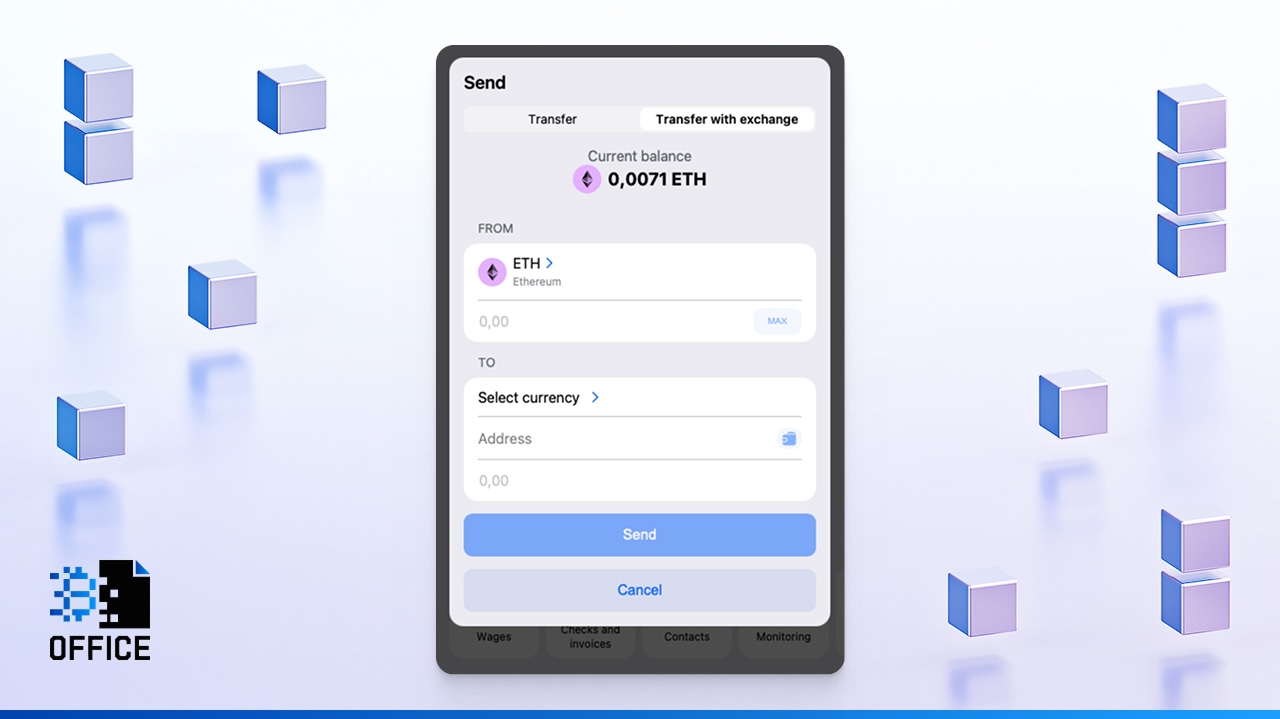
Choose the target asset and network – for example, USDT ERC-20
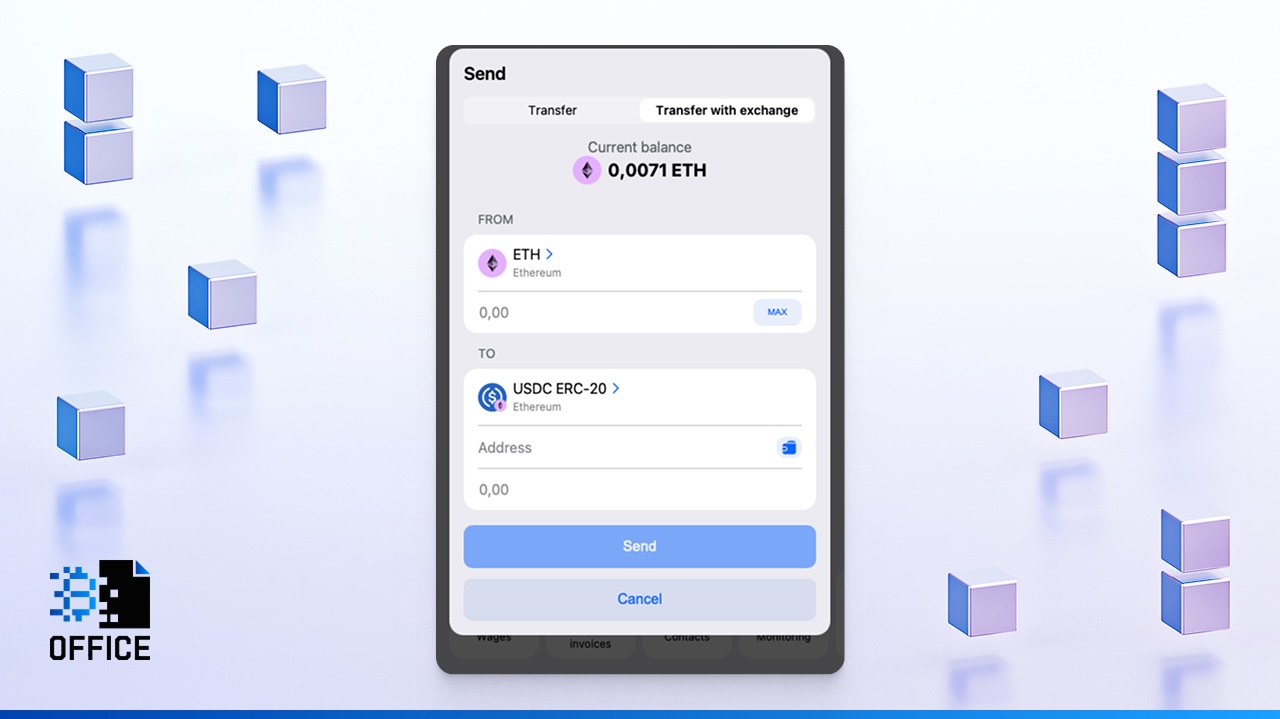
- Enter the recipient's ETH address
- Enter the amount and confirm the operation
After confirmation, Crypto Office automatically runs an AML check and processes the exchange. The recipient will get USDT directly to their wallet address on Ethereum. No need for bridges or third-party converters.
Security When Working With Ethereum
In the Ethereum network, errors are typically permanent. If you send money to an incorrect address, getting it back is usually impossible. The fundamental rule is simple: verify the recipient address multiple times before confirming any ETH transfer. ETH wallet addresses always start with 0x.
Before you okay a transfer or swap, double-check that you've picked the right network and token type. Usually, ERC-20 is used for the Ethereum network. If you're sending to an exchange, see which network it accepts. Getting networks mixed up is a frequent reason why funds disappear.
If you're asking how do I send Ethereum from one wallet to another safely, the checklist is:
- Confirm the recipient address character by character
- Verify the selected network matches the destination
- Ensure you have enough ETH to cover the gas fee, even when sending ERC-20 tokens
- Check the transaction details one final time before hitting confirm
In Crypto Office, cross-chain swaps are only executed after a successful AML check, and tokens are delivered to the specified wallet address on the chosen network.
Monitoring and Tracking Ethereum Transfers
Once you send something, the transaction hash is the most useful thing you'll get. It allows you to see what's going on with the blockchain as it happens.
To check any operation, use a blockchain explorer. For Ethereum, head to etherscan.io and paste your transaction hash into the search box. The explorer will show full details about all operations from your address – status, confirmations, fee paid, and block time. This method always works, because the data comes directly from the blockchain itself.
Crypto Office also saves all transaction details in your operation history. Additionally, the platform includes a dedicated Monitoring feature for tracking wallets, which lets you:
- Track balances across multiple wallets
- Quickly check one or several addresses at once
- Monitor multiple wallets simultaneously
- Add the Crypto Office bot to a group chat to track any address collaboratively
The wallet monitoring feature is available at: crypto-office.com/crypto-monitor
Conclusion
Ethereum is the base for crypto transfers and swaps. Working with it means paying attention to the small stuff: double-check the address and network you're using, get how fees are set, and keep tabs on your transactions. Crypto Office makes using Ethereum easier–from regular transfers to swaps between different blockchains–so you can securely and easily manage your assets all in one spot.
Michael Turner knows his stuff when it comes to crypto and blockchain. He puts out content that's not only well-researched but also easy to understand, helping people get a handle on managing their digital assets.