

The Ethereum network is rightfully considered the backbone of the crypto economy. The vast majority of decentralized projects and blockchain-based platforms are built on top of it. According to Santiment data, the average daily number of active addresses on Ethereum reached 837,200 in March 2026. At the start of 2026, an all-time record was set: an average of 327,000 new ETH addresses were created every single day for an entire week.
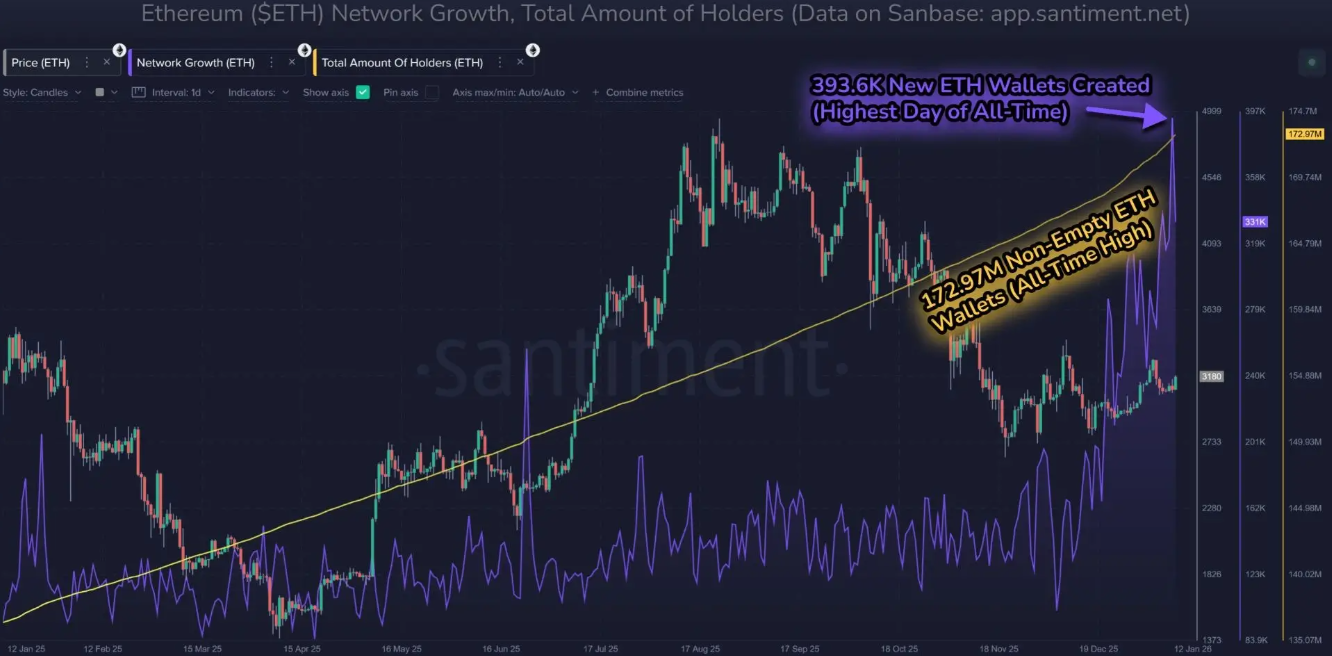
The total number of ERC-20 wallets has already surpassed 172.9 million. Behind these figures are everyday users, businesses, and services that have chosen Ethereum as the foundation of their operations.
In this guide, we will cover what is an ERC-20 wallet, how it works, which one to choose, and how to create an ERC-20 wallet step by step.
What Is an ERC-20 Wallet and How Does It Work on the Ethereum Network
To understand what is an ERC-20 wallet, we first need to look at the ERC-20 standard itself. ERC-20 (Ethereum Request for Comments 20) is a set of rules and functions that defines how a token should behave within the Ethereum network. The standard was introduced in 2015 and has since become the most widely adopted token specification in blockchain history.
The standard defines several mandatory functions, including:
- Balance verification;
- Token transfers between addresses;
- Approval for spending funds on behalf of another address.
Thanks to this specification, developers of decentralized applications (dApps) do not need to account for the specific behavior of each individual token – all ERC-20 tokens follow the same rules.
An Ethereum ERC-20 wallet is not a storage container in the traditional sense. Your tokens are not physically sitting inside an app. The wallet stores a private key that gives you the right to control a wallet address on the blockchain. The tokens themselves are embedded in a smart contract. Your balance is simply a record next to your address in that contract's registry.
Each ERC-20 wallet has a unique address starting with "0x" followed by 40 hexadecimal characters. This is your public identifier – the address you share with anyone who wants to send you cryptocurrency. Knowing how to get an ERC-20 wallet address is one of the first things every crypto user needs to learn.
How to Create an ERC-20 Wallet: Step-by-Step Guide
To create an ERC-20 wallet, you need a compatible interface. Below, we walk through the process using Crypto Office as an example – a Telegram-based crypto service that makes wallet creation fast and straightforward.
Step 1. Open the bot in Telegram or search for the service name in the Telegram search bar.
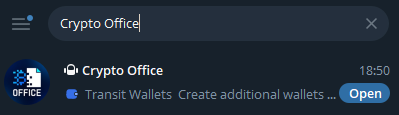
Step 2. Type the command "/start" in the bot chat. Your personal account will be ready immediately – no lengthy registration required.
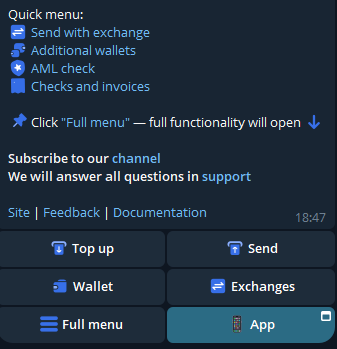
Step 3. From the main menu, navigate to the "Wallet" section. You will see a ready-to-use Ethereum address with full ERC-20 support. This is your ERC-20 wallet address, which you can safely share with senders to receive payments.
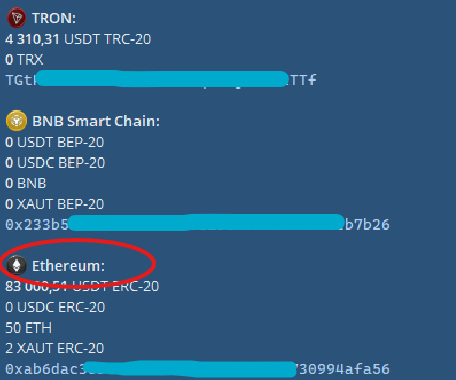
This is one of the simplest ways to create an ERC-20 wallet – the entire process takes seconds, requires no technical knowledge, and no KYC verification.
Which ERC-20 Wallet to Choose
Choosing the right ERC-20 wallet is more than just picking an attractive app. This decision directly affects:
- The security of your funds;
- The convenience of your daily operations;
- Your ability to participate in promising blockchain projects;
- How well your workflow or business processes are optimized.
Here are the key criteria to evaluate:
Wallet Type. Hardware wallets like Ledger or Trezor store your private keys offline. This is the most secure option. However, these devices cost money and require manual connection for every operation.
Network Support. Check which blockchains the wallet is compatible with. If you plan to use more than just Ethereum, make sure the wallet supports other networks.
Security. Pay close attention to additional protection mechanisms. This is critical. Wallets like Crypto Office protect users from address-substitution attacks – a common scam where fraudsters copy similar-looking addresses and count on user inattention.
Usability and Fees. The interface should be intuitive. You should be able to send tokens quickly without unnecessary steps. Fee customization also matters – gas fees on the Ethereum network can vary significantly. Flexible settings let you either save money or speed up your transaction.
Additional Features. A modern Ethereum ERC-20 wallet is a full-featured tool. It helps you manage assets, streamline your crypto workflow, and gives you greater control. For businesses, it enables process optimization. For developers, it offers integration capabilities.
Technical Capabilities. Don't overlook infrastructure. API support allows you to embed a wallet into your service or application. Additional checks such as AML screening enhance the security of ERC-20 token exchanges.
How to Use a USDT ERC-20 Wallet: Receiving and Sending Tokens
Understanding what a USDT ERC-20 wallet is is essential for anyone who works with stablecoins. USDT (Tether) is the most widely used stablecoin in crypto, and the ERC-20 version runs natively on the Ethereum blockchain. Below, we cover how to receive and send USDT ERC-20.
Receiving USDT to Your Wallet
To receive Tether ERC-20, follow these steps:
- Open your wallet.
- Copy your address or show the QR code to the sender.
- Wait for the funds to appear in your ERC-20 wallet balance.
Sending USDT
To transfer Tether ERC-20 to another wallet:
- Go to your wallet.
- Select USDT ERC-20 from your assets.
- Tap "Send".
- Enter the recipient's wallet address.
- Enter the transfer amount.
- Confirm the USDT transaction.
Imagine you need to pay salaries in crypto to twenty freelancers, or distribute rewards to a hundred project participants. Sending funds to each address individually wastes time and increases the risk of errors.
Crypto Office features a mass payment function. You upload a list of addresses and amounts, and the system creates and sends all transactions in one click. This saves hours of manual work, minimizes errors, and generates a detailed report for every payment.
How to Verify an ERC-20 Wallet: Address and Network Validation
As of June 2024, at least $83.6 million worth of ERC-20 tokens had been lost due to incorrect transfers. Funds were sent to addresses not designed to receive tokens, addresses with typos, or the wrong network entirely. These funds cannot be recovered. That is why verifying a wallet before sending is a non-negotiable precaution.
Blockchain Explorer
The most reliable way to verify a wallet or transaction is through Etherscan, the official Ethereum blockchain tracker. To check an address, paste it into the search bar at etherscan.io. You will see:
- The current balance of the specified address;
- A full list of ERC-20 tokens with quantities and USD values;
- The complete history of incoming and outgoing transactions;
- A dedicated tab showing ERC-20 token transfers specifically.
Network Verification
The most common beginner mistake is sending tokens on the wrong blockchain. For example, USDT is supported on multiple networks: Ethereum, TRON, BNB Smart Chain, Polygon, Arbitrum, Optimism – and this list is not exhaustive. A transaction on the BSC network will not appear on Ethereum. Both addresses start with "0x", but the blockchains are entirely different.
Before sending, always confirm that the network selected in your wallet matches the recipient's network. If someone says they accept tokens on ERC-20, but you send via BEP-20 – the funds will be lost.
For cross-network verification, use alternative explorers. Blockchair supports over 20 networks simultaneously. By pasting an address, you can see its activity across multiple blockchains at once – ideal for comprehensive analysis.
Manual Validation
Software address validators exist and can check whether a string matches the format of a specific network. However, these tools do not guarantee that the address is real or belongs to a specific person – they only confirm format correctness. For this reason, manually checking the first and last five characters of an address remains the gold standard of verification. This is a key part of knowing how to get an ERC-20 wallet address right every time.
ERC-20 Wallet in Telegram: Features and Benefits
Telegram has long been a hub of digital life – communication, work, and news all in one place. It is only natural that financial management has followed. An ERC-20 wallet embedded in Telegram is the next step in convenience.
Telegram requires no separate app installation. There is no lengthy registration. The messenger itself acts as both your identifier and your operating environment. The key advantage of this approach: everything in one place.
Thanks to Telegram's mini-app functionality, users gain access to multifunctional solutions within a single interface. Crypto Office is one such solution. Storing, exchanging, transferring, and monitoring ERC-20 token flows – all in just a few taps. For those who value their time and don't want to juggle dozens of separate apps, this is the optimal approach. It makes managing crypto as simple and natural as sending a message.
Fees and Limits When Using an Ethereum ERC-20 Wallet
Every blockchain operation has a cost – payment for computational resources. On Ethereum, this fee is called gas. Each blockchain sets its own fee rules.
A quality Ethereum ERC-20 wallet helps you manage these costs. It shows you the fee before you confirm a transfer or exchange, and some services automatically find the most cost-efficient route for sending funds, including Ethereum-based tokens.
In addition, a crypto wallet may charge a small service fee. In Crypto Office, these parameters are fully transparent, which simplifies cost calculation. For example, sending USDT ERC-20 costs 1.29 USDT or 0.0005 ETH. The minimum transfer amount is 1 USDT or 0.001 ETH. All fees are displayed before the user confirms a send or exchange transaction.
Common Mistakes When Creating and Using an ERC-20 Wallet
Let's look at the most frequent errors made by ERC-20 wallet users.
Storing the seed phrase digitally. Screenshots, cloud notes, or files on your computer are all risks. They can be hacked. Your seed phrase must be stored offline only – written on paper and kept in a secure location.
Confusing networks. Users sometimes select the wrong network when sending tokens. The address may look identical, but the blockchains are different. Funds end up in the wrong place. Always verify the network before sending.
Skipping the test transfer. Saving on fees seems reasonable, but it is a mistake. Without a test, you risk the full amount. Send a small amount first – then proceed with the main transfer.
Sending tokens to a contract address. Some users copy the token address from a block explorer. This is incorrect. A contract is not a wallet. Funds sent there are lost permanently.
Careless address copying. Malware can replace the address in your clipboard. You copy one, but something different gets pasted – and it looks almost identical, but belongs to a fraudster. Always check the beginning and end of the address before sending.
Trusting unknown tokens. Sometimes unfamiliar tokens appear in your wallet. This is a trap. Interacting with them can lead you to a phishing site and result in stolen funds. Do not interact with such assets or follow suspicious links.
Misjudging gas fees. The network may be congested, causing fees to spike. If you set gas too low, your transaction may stall. In some cases it gets rejected, but the fee is still deducted. Check current fee levels before sending, or use services with automatic gas optimization.
Conclusion
An ERC-20 wallet is a key entry point into the Ethereum economy. Anyone can create an ERC-20 wallet – the process takes seconds. The market offers a wide range of solutions: hardware, software, and web wallets; custodial and non-custodial; multi-chain and specialized.
Choose based on your needs. Telegram-based applications deserve special attention – they set a new standard for simplicity while packing the full power of Ethereum into a single interface. Crypto Office embodies this approach: fast wallet creation, secure exchanges, mass payments, AML screening, and transaction tracking – all in one place. It is a solution built for those who value comfort, reliability, and functionality.
Michael Turner knows his stuff when it comes to crypto and blockchain. He puts out content that's not only well-researched but also easy to understand, helping people get a handle on managing their digital assets.