

Besides investing, cryptocurrencies are also used for payments, one-off transfers, giveaways, and more. That means there are several ways to send them, and one popular alternative is the crypto cheque. This mechanism lets you send tokens to another person on Telegram in just a few seconds, without ever asking for a wallet address.
In this article, we'll take a close look at what a crypto cheque is, how it works, and how it differs from a regular transfer.
What Is a Crypto Cheque?
A crypto cheque is a tool for transferring digital currencies – essentially a digital voucher. It lets you send a set amount of tokens to another user through a special link.

Once such a cheque is created and sent, the cryptocurrency is reserved by the service, and the recipient activates it to receive the funds in their own wallet.
Unlike a traditional bank cheque, a crypto cheque exists only in digital form. It's built on blockchain technology, so every transfer is recorded publicly. The cheque itself doesn't store the cryptocurrency – it only grants the right to claim the funds once activated.
How a Crypto Cheque Differs From a Regular Transfer
At first glance, a crypto cheque might seem to do the same job as an ordinary cryptocurrency transfer. However, there's an important difference between them. A standard transfer requires knowing the recipient's exact wallet address, choosing a suitable wallet or exchange, and selecting the supported network.
A crypto cheque works differently. Instead of an address, a link or activation code is generated. The recipient simply activates it in a private message on Telegram, after which the cryptocurrency arrives in their wallet balance. This approach makes it much easier to receive digital assets and reduces the risk of a sending error.
Another advantage lies in its flexibility. A single crypto cheque can be sent in a private message, posted in a group chat, or used as part of an interactive activity with users.
A Key Feature of Crypto Cheques
Every crypto cheque can be claimed only once. After activation, the cheque becomes invalid.
How to Create a Crypto Cheque in Telegram via Crypto Office
You can generate a cheque for sending cryptocurrency on Telegram in just a few minutes. There's no need to install any extra software or figure out complicated settings – simply open the Crypto Office bot, choose the right section, and specify the transaction parameters. The service will automatically generate a link that you can send to another user.
Thanks to its simple interface, the service suits beginners and experienced users alike, all of whom value speed, convenience, and automation in their everyday transfers.
The Crypto Office bot lets you issue a crypto cheque in USDT, USDC, ETH, BNB, BTC, TRX, and SOL.

Open the Bot and Select "Cheques and Invoices"
To get started, open Crypto Office on Telegram. The main menu with all the wallet's features becomes available right in the bot's chat. You can also launch the mini-app.
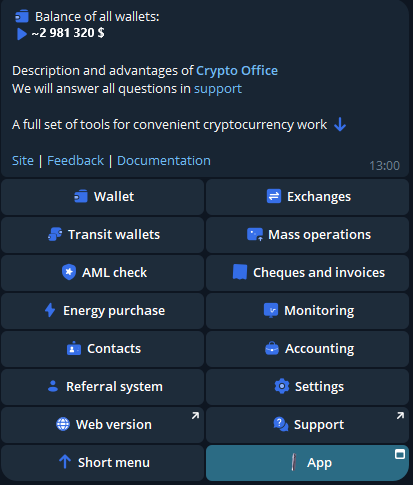
To create a cheque, go to the "Cheques and Invoices" section. It brings together the tools for transferring digital assets and issuing invoices.
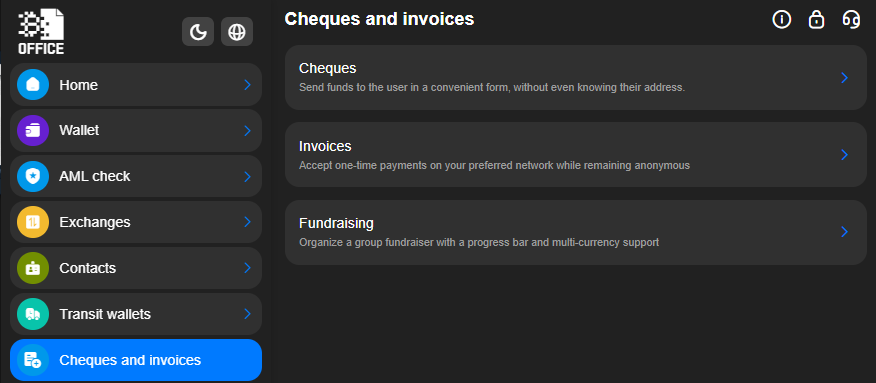
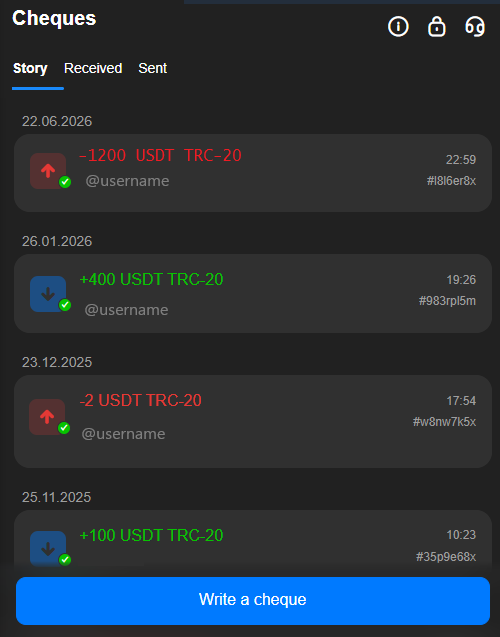
Tap "Cheques," then "Issue a Cheque."
Choosing the Cryptocurrency, Network, and Entering the Amount
The next step is to specify the network and the asset.
First, select the network. Then choose the cryptocurrency you want to send – for example, USDT or another token.
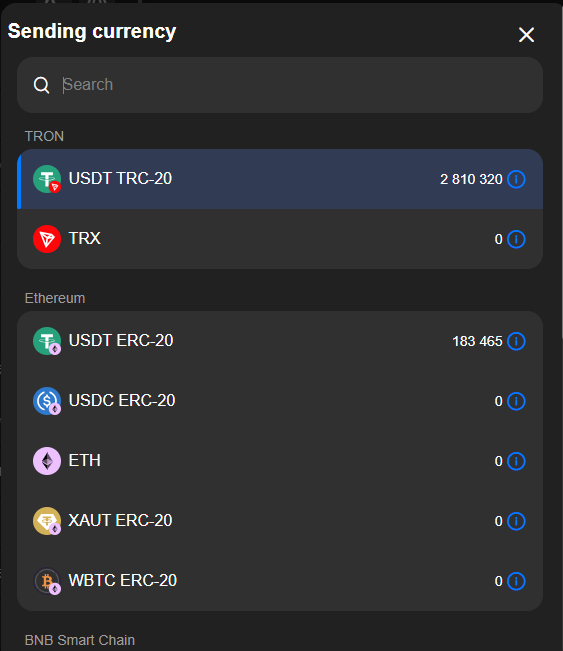
Enter the amount. The bot will immediately display the final transaction details and then ask you to confirm the creation of the cheque.
As soon as the process is complete, Crypto Office will generate a unique link that can be sent in a private message or posted in a chat.
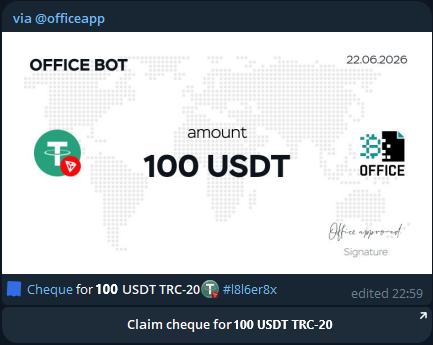
Customizing and Sending a Crypto Cheque
Once a cheque is created, you can give it a visual design. Crypto Office offers several personalization options for cheques.
When creating it, you can add a cover image for the cheque and leave a short comment – for example, a congratulation, a thank-you note, or a brief description of the occasion.
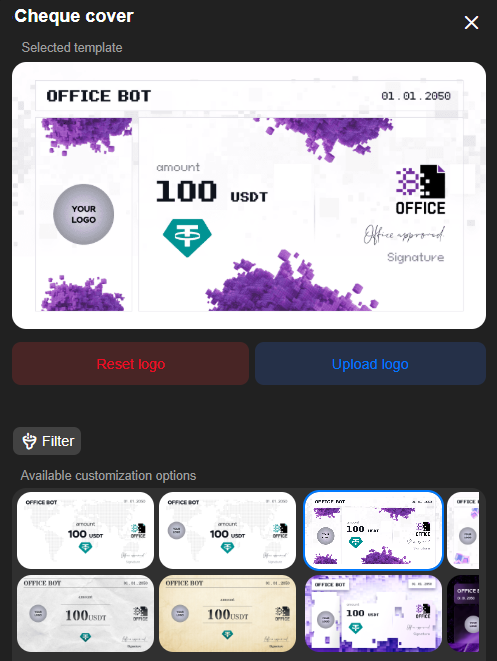
Once all the parameters are set, all that's left is to confirm the creation. The bot will generate the cheque as a card with a link, which can be sent as a private message to a Telegram contact.
How to Send a Crypto Cheque on Telegram?
Crypto Office lets you manage cheques directly in chats. Just select the recipient on Telegram and enter the command "@officeapp send amount." Then choose the network and the token, and tap "Issue a Cheque for XXX."
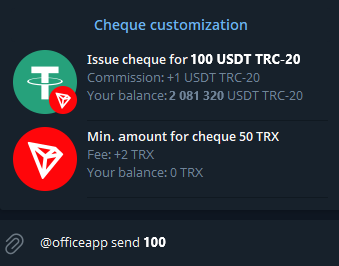
The bot will automatically attach a cheque card to the message. All the recipient needs to do is activate the funds.
This method is convenient both for personal transfers and for mass distributions. If a crypto cheque is set up for multiple activations, it can be posted in a group or a channel. Users can follow the link and claim their share of the cryptocurrency until the set limit is reached.
How to Activate a Crypto Cheque
Once the recipient receives the cheque, they see it in the chat with the sender, with an activation button displayed right below it. After tapping it, the funds are sent to the wallet address in Crypto Office. Even if the recipient doesn't yet have a wallet in the service, one is created automatically.
After confirmation, the cryptocurrency arrives in the chosen wallet. This completes the activation, and the crypto cheque is considered used.
How Can You Customize a Crypto Cheque?
Before creating a cheque in the Telegram wallet, you can configure a few additional parameters.
First, you can choose a recipient from your contact list or enter a username manually. In addition, Crypto Office lets you secure such transfers with a confirmation step. After activation, the sender can approve or decline the transfer. Available cheque settings in Crypto Office:
- No confirmation. The recipient receives the funds at their address instantly;
- One confirmation. The recipient can activate the cheque only after one confirmation from the sender;
- Two confirmations. The recipient can receive the funds only after two confirmations from the sender;
- PIN code. When the recipient activates the cheque, the sender must enter a PIN code to confirm the transfer of funds.
Conclusion
A crypto cheque removes the need to copy long wallet addresses, double-check them, and worry about a possible mistake. All you need to do is specify the amount and send the cheque to the recipient on Telegram. This format saves time and makes transferring digital assets much simpler. It can be used for personal transfers, sending gifts, running giveaways, or rewarding community members with bonuses.
Creating a crypto cheque takes just a few clicks, and Crypto Office offers flexible options for managing this kind of transfer.
Journalist and editor specializing in crypto markets and blockchain infrastructure, covering regulatory shifts, institutional adoption, and the evolution of Web3 protocols.