

SDC is a popular stablecoin in the crypto market.In 2025, over $18 trillion in transactions were processed in USDC.This stablecoin is good for transfers, savings, and general settlements, as it functions outside of traditional banks. USDC is officially regulated, widely supported by major exchanges, and available across multiple popular blockchain networks.
In this guide, we’ll take a closer look at what USDC is, how to send USDC, and which networks are the most efficient for fast and cost-effective transfers in 2026.
What Is USDC and Why Do People Transfer It?
USDC is a stablecoin that Circle issues in collaboration with Coinbase.It launched on Ethereum, then expanded to several other networks.Each USDC token is backed one-for-one by the US dollar, which makes its value stable and predictable.
Because of this stability, USDC has become a practical tool for everyday crypto operations. Users regularly how to transfer USDC for several reasons:
- sending funds between wallets
- converting crypto into fiat via exchanges
- locking in profits during market volatility
- swapping USDC for other cryptocurrencies
- long-term capital storage
Every USDC transaction requires a network fee, also known as gas. The usdc transfer fee depends on the selected blockchain and current network load, which can vary significantly.
Which Network Is Best for Transferring USDC?
USDC is no longer limited to Ethereum. Today, it is supported on TRON, BNB Smart Chain, Base, Polygon, Solana, and several other ecosystems. Each network differs in transaction speed, cost, and overall usability.
Choosing the right blockchain directly affects usdc transfer time and total costs. Below is a comparison of the most commonly used networks for USDC transfers:
| Network | Average Fee | Transfer Speed | Key Notes |
|---|---|---|---|
| Tron (TRC-20) | 6–13 TRX | High | Fast network with simple transfer logic. Supports bandwidth and energy to reduce costs. |
| Ethereum (ERC-20) | $1–$20 | Medium | Highly secure but fees depend heavily on network congestion. |
| BNB Smart Chain (BEP-20) | $0.01–$0.10 | High | Very low fees and fast confirmations. EVM-compatible. |
| Arbitrum | $0.05–$0.30 | High | Ethereum L2 with strong DeFi support and lower costs. |
| Polygon | $0.002–$0.02 | High | Extremely low fees, ideal for micro-payments in USDC. |
| Solana (SPL) | $0.00025–$0.005 | High | One of the fastest networks available for USDC transfers. |
| Optimism | $0.05–$0.50 | High | Ethereum L2 with major DeFi integrations. |
| Base | $0.05–$0.20 | Medium | Coinbase-focused L2 with a rapidly growing ecosystem. |
There is no universal “best” option, but we can make intelligent choices that work for our particular needs.The right network really depends on what's most important to you: lower fees, how fast transactions complete, or if it needs to work with particular platforms. In practice, this determines how long does USDC take to transfer and how much you ultimately pay.
How to Prepare a Wallet for a USDC Transfer
Before you how to send USDC to another address, proper wallet preparation is critical. This helps avoid mistakes and reduces the risk of losing funds.
First, make sure your wallet supports the correct blockchain network. USDC exists in different formats depending on the network. If you choose the wrong network during a transfer, funds are usually lost permanently.
Second, it’s important to check the transaction history and risk profile of your wallet. A high AML risk score is one of the main reasons exchanges refuse incoming USDC deposits. Using AML tools before sending funds helps prevent blocks or freezes.
Crypto Office, for example, allows users to run quick AML checks on USDC and wallet addresses. In just a few seconds, the system displays the risk level, helping ensure the assets are clean and transferable.
Finally, always keep a small balance of the native network token to cover fees. Even though USDC itself is stable, every blockchain requires gas to process transactions. This directly affects how much does it cost to send USDC.
Transfer USDC Without High Fees and Extra Risks
Crypto Office is a multifunctional platform designed for secure crypto transfers. One of its key features is cross-chain USDC transfers. This allows users to send USDC on one network and receive the same stablecoin on another.
For example, you can send USDC on Ethereum (ERC-20) and receive it on TRON (TRC-20). This approach can significantly reduce both usdc transfer fee and waiting time.

How to Transfer USDC: Step-by-Step Guide
Transferring USDC is a basic operation for most crypto users. However, this is also the stage where mistakes happen most often. Understanding how to send USDC correctly helps avoid delays, unexpected fees, and irreversible losses.
Below are two main scenarios for transferring USDC:
- transfers within the same blockchain network
- cross-chain transfers between different networks
Each option has its own nuances that affect usdc transfer time and overall cost.
USDC Transfer Within the Same Network
This option is suitable when both the sender and the recipient use the same blockchain. For example, USDC on Ethereum (ERC-20).
To how to transfer USDC within one network using Crypto Office, follow these steps:
- Log in to your Crypto Office account.
- Select USDC on your balance (for example, USDC ERC-20).
Click “Send”.
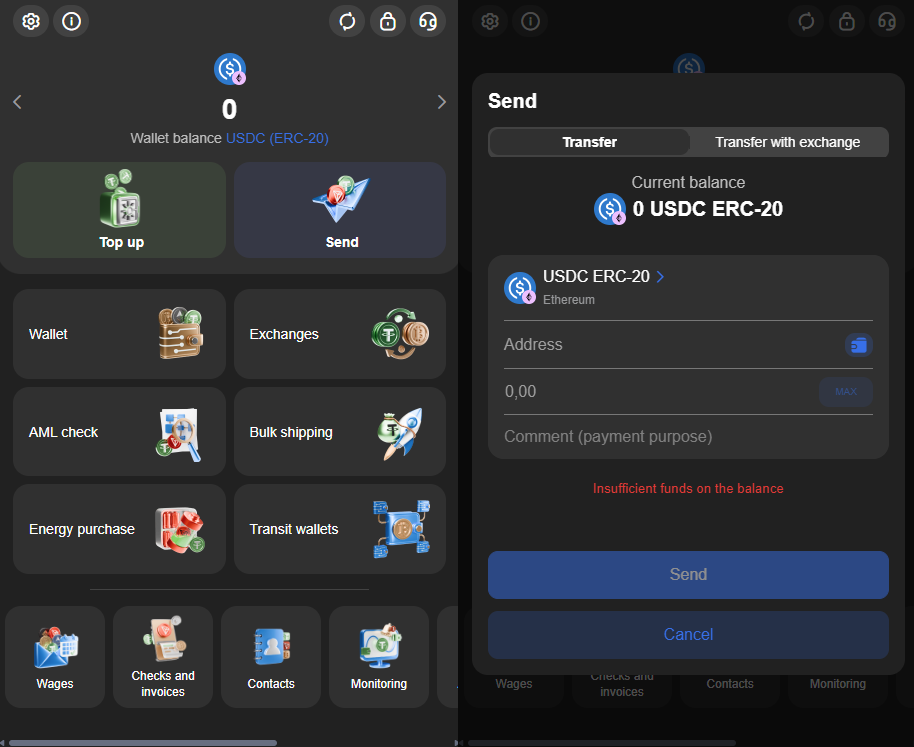
- Enter the recipient’s USDC wallet address in the same network.
Specify the amount to send.
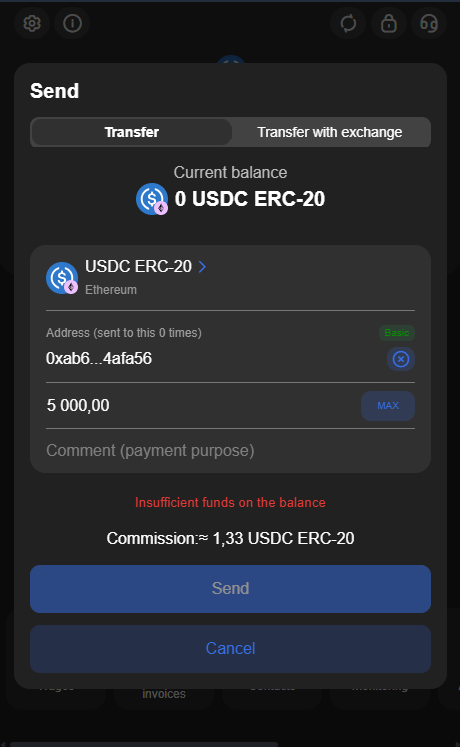
- Confirm the transaction.
After the blockchain confirms the transaction, the USDC will appear in the recipient's wallet, ensuring a reliable transfer for the user.The transfer often takes a short time, typically a few seconds to a few minutes. This depends on network activity and how quickly confirmations are processed.
Please verify the wallet address before confirming your transaction. This will help prevent errors.Please double-check your input carefully. A small mistake, like an incorrect character, will lead to the permanent loss of funds. Once submitted, the transaction cannot be reversed.
Cross-Chain USDC Transfer
Moving USDC between different blockchains needs a cross-chain transfer.You can send assets from one network to another, for instance, moving an asset from Ethereum (ERC-20) to BNB Smart Chain (BEP-20) or from TRON (TRC-20) to a different network.
Crypto Office simplifies this process significantly. The system automatically calculates the route, displays the usdc transfer fee, and shows the final amount before confirmation.
To complete a cross-chain transfer:
- Open your Crypto Office wallet.
- Select USDC in the source network (for example, ERC-20).
Click “Send” and choose “Send with exchange”.
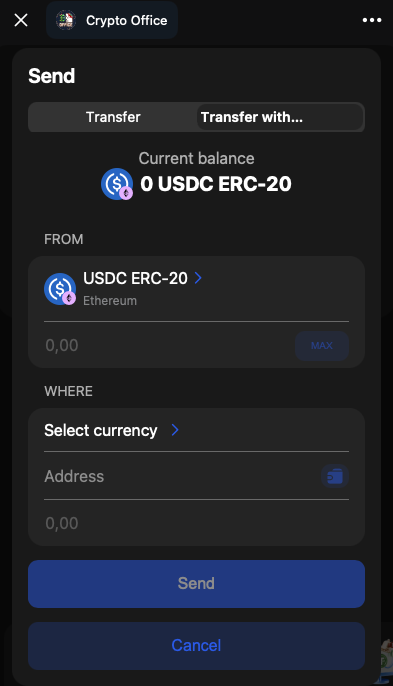
- Enter the amount of USDC to transfer.
Specify the recipient’s address in the target network.
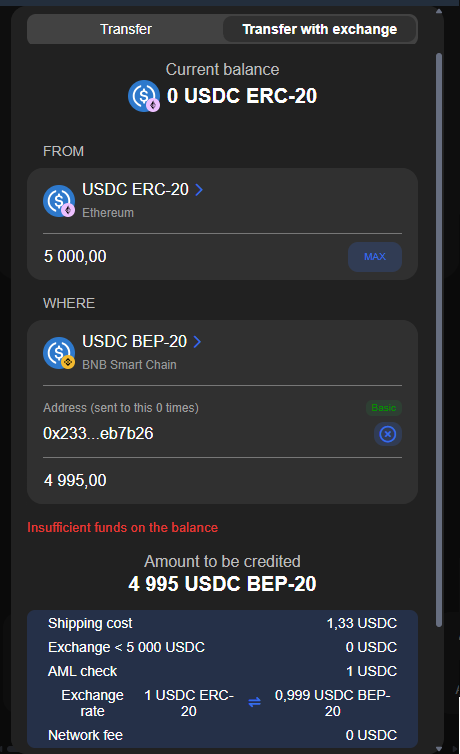
- Confirm the transaction.
During cross-chain transfers, Crypto Office delivers exchange-grade USDC. Funds sent to the recipient are sourced directly from exchanges and pass an AML check beforehand. This reduces risks associated with dirty liquidity and improves acceptance by exchanges.
USDC Transfer Fees Explained
Transaction fees are unavoidable when working with USDC. They are paid in the native token of the selected blockchain and depend on network load and transfer method.
The first key factor is the blockchain itself. Fast and scalable networks offer lower fees and faster confirmations, which directly affects how much does it cost to send USDC. Over time, even small differences in fees can add up for users who send USDC frequently.
The second factor is the transfer method. When using Crypto Office, the system automatically selects the most cost-efficient route. Fees are calculated in advance, so users see the final cost immediately. There are no hidden charges.
The specific timing is also important.During busy times on the network, fees may rise.If the exchange is not urgent, waiting for less network congestion can help lower costs. This approach helps optimize both usdc transfer time and expenses.
Common Mistakes and Security Tips
Most USDC losses are caused not by technical failures, but by human error. Sending funds to the wrong address or selecting the incorrect network are the most common issues.
Always verify the blockchain network before sending USDC. Even if the wallet address looks valid, using the wrong network means the funds will not reach the recipient. This is a critical rule for anyone learning how to transfer USDC safely.
Do not skip preliminary checks. AML tools, such as those available in Crypto Office, allow users to assess wallet risk levels in advance. This reduces the likelihood of transaction freezes or rejections by exchanges and payment platforms.
It’s also recommended to perform a test transaction. Sending a small amount first helps confirm that everything works correctly. Once confirmed, the main transfer can be completed with confidence.
A secure transfer is not about complexity, but attention to detail. Using a reliable service simplifies the process and minimizes risks, even for users who are relatively new to crypto.
Conclusion
USDC is expected to remain a very practical option for crypto transfers in 2026.Its stable price, wide network accessibility, and clear regulatory standing make it a good choice for personal transfers, business activities, and decentralized finance functions.
Crypto Office makes sending USDC much simpler, allowing users to send funds both on their native chain and across different chains, all from one place. This system handles multiple chain transfers, and the single interface helps to explain how transfers work.Users gain from clear, predictable fees, quicker processing, and lower operational risks when the system is in place.
Michael Turner knows his stuff when it comes to crypto and blockchain. He puts out content that's not only well-researched but also easy to understand, helping people get a handle on managing their digital assets.