

Bitcoin is used for transfers all over the world. Hundreds of thousands of transactions are processed on the Bitcoin network every day, and the total volume of transfers reaches billions of dollars.
If you want to learn how to send Bitcoin safely and without errors, it is worth understanding the process before your first transaction.
This guide walks through everything you need to know before sending BTC to another wallet — from checking the recipient's address to understanding network fees and avoiding common mistakes.
What You Need to Know Before Sending Bitcoin
Before you send Bitcoin to an address, there is one foundational rule to keep in mind: Bitcoin transactions are irreversible. Once a transfer is confirmed on the blockchain, it is permanently recorded and cannot be undone. This makes any error in the recipient address or network selection critical.
To complete a transfer, you need a crypto wallet, the recipient's Bitcoin address, and a sufficient BTC balance. The address is a long string of characters — it is best never to type it manually. Even a single typo can result in a permanent loss of funds.
Network fees also matter. They depend on how congested the blockchain is at the time of the transaction. When the network is busy, transfers can take longer and cost more. On average, Bitcoin transactions are confirmed within 10–60 minutes, though in some cases this timeframe can extend further.
How to Send Bitcoin to Another Wallet
The process of how to send Bitcoin to another wallet follows the same basic principle regardless of which app you use. The only differences are in the interface. Here is a step-by-step walkthrough using Crypto Office as an example:
Open the app and check your balance. Make sure you have enough BTC to cover both the transfer amount and the network fee.
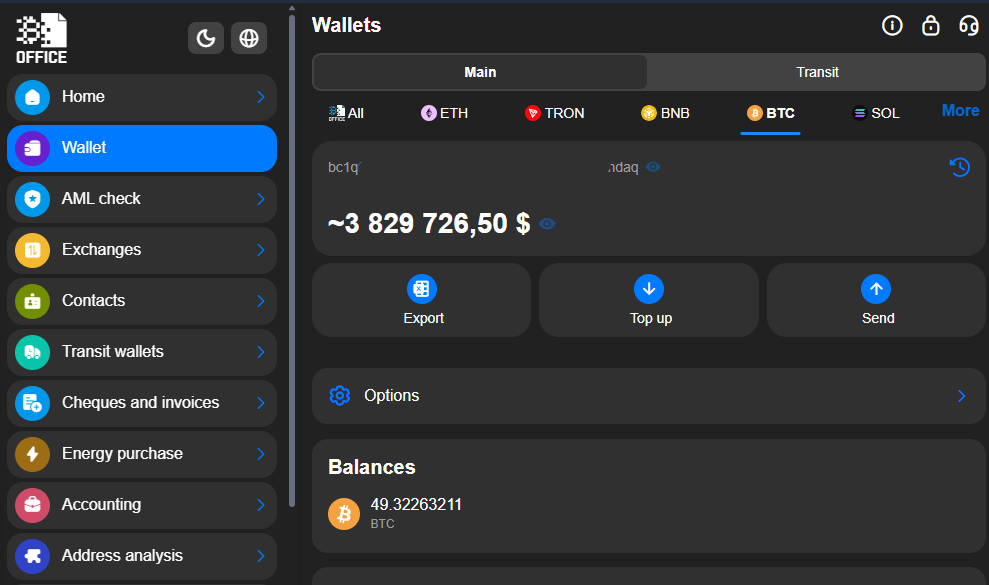
- Get the recipient's address. Copy it directly or scan it using a QR code.
- Tap "Send" in your wallet app.
Paste the address and verify it carefully — check the first and last characters to rule out any errors.
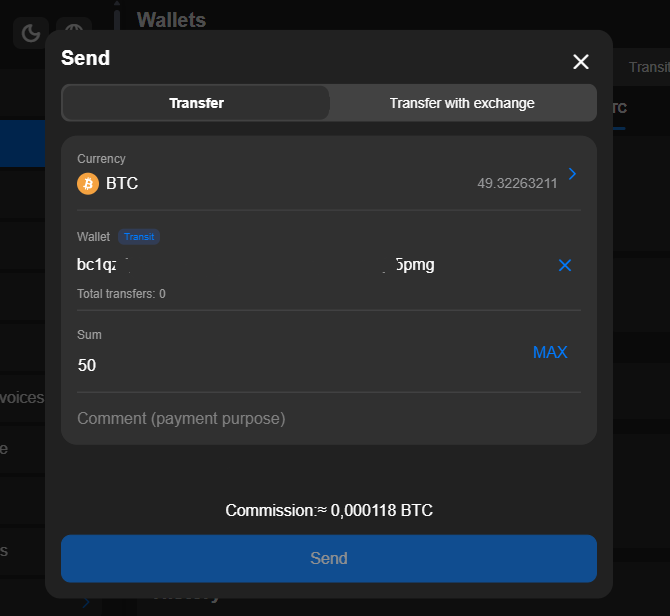
- Enter the amount of BTC and confirm that the network fee is accounted for.
- Confirm the transaction.
After sending, the wallet will provide a TXID — a unique transaction identifier — and save the details to your account history.
Sending Bitcoin From an Exchange to an External Wallet
If you want to know how to send BTC from an exchange to an external wallet, start by getting the receiving address in your wallet. Go to your wallet assets, tap "Receive", and copy the address that appears.
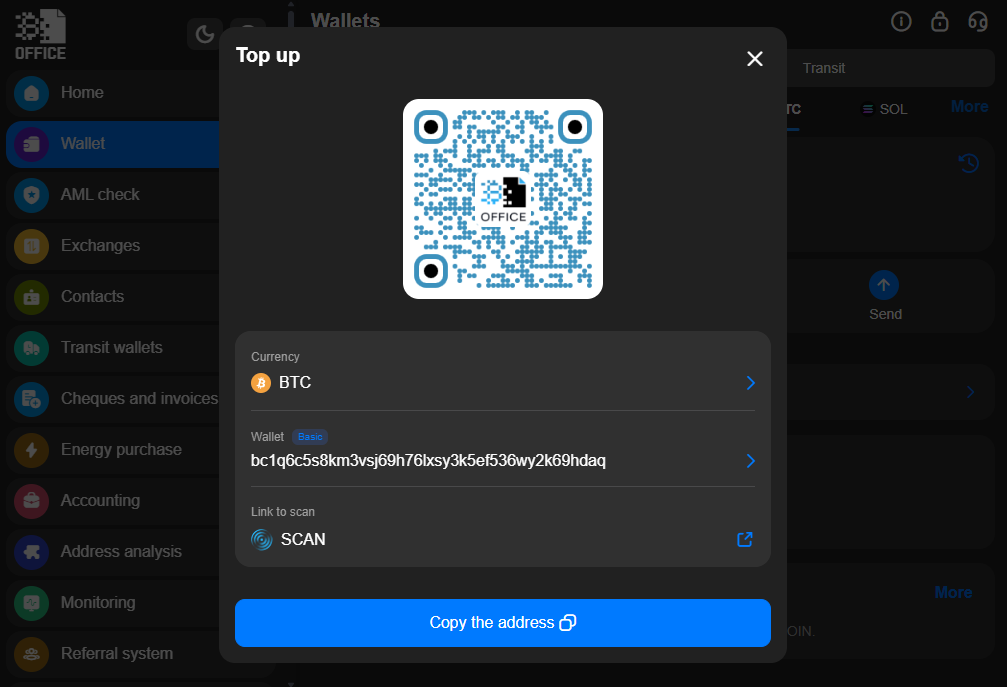
Then, log into your exchange account, open the Withdrawal section, and paste the wallet address. Make sure you select the Bitcoin network. Before confirming, the exchange will display the fee and the final amount.
For large transfers, always send a small test amount first. This confirms the address is correct and the right network is selected before committing to the full sum.

How to Send Bitcoin Without Errors
Most mistakes when transferring BTC happen due to inattention. A wrong address, an incorrect network, or an accidental typo can lead to permanent loss of funds. This is why every detail should be verified multiple times before confirming.
Getting and Verifying the Recipient's Address
When figuring out how to send someone Bitcoin, the first step is getting a verified address from the recipient. It is usually shared as text or a QR code. Scanning a QR code is the safer option since it eliminates the risk of manual copying errors.
After pasting the address, check the first and last characters. This helps confirm the address was not silently altered by malicious software. If you are transferring a large amount, send a small test transaction first and wait for confirmation before sending the rest.
Some wallets — like Crypto Office — automatically validate the address format and network before the transaction is submitted, which significantly reduces the risk of a costly mistake.
Choosing the Right Network and Address Format (Legacy, SegWit, Taproot)
To complete a transfer, you must use the Bitcoin network. It is also important to account for the recipient's address format. Bitcoin addresses come in different types:
- Legacy addresses start with the number 1 — the oldest format, typically carrying higher fees.
- SegWit addresses start with 3 — faster and cheaper for transactions.
- Native SegWit and Taproot addresses start with bc1 — the most modern format, offering the lowest fees and most efficient processing.
Before sending, confirm that the wallet or exchange you are using supports the recipient's address format.
Confirming the Transaction and Getting the TXID
Once the address, amount, and fee are verified, confirm the transfer. After it is sent, your wallet will generate a TXID. Paste this ID into a blockchain explorer such as blockchain.com/explorer to track the status of your transaction in real time.
Bitcoin Network Fees Explained
Every time you send BTC to another wallet, a network fee is paid to the miners who verify and record the transaction on the Bitcoin blockchain. Even small transfers are subject to this fee, and costs can spike when the network is under heavy load.
The fee also depends on the address type and the size of the transaction data. Transfers to modern SegWit or Taproot addresses are generally cheaper than those involving older Legacy addresses.
Most wallets calculate the optimal fee automatically. You enter the recipient's address, the amount, and confirm — the wallet handles the rest.
How to Estimate Transaction Cost Based on Network Load
When the Bitcoin network is congested, miners prioritize transactions with higher fees. This means a low-fee transfer can sit unconfirmed for hours or even days. In some cases, an unconfirmed transaction is dropped automatically and the BTC is returned to the sender's wallet.
Some wallets support Replace-by-Fee (RBF), a feature that lets you increase the fee on a stuck transaction after it has been sent.
Before transferring, it is worth checking the current network load. Tools like Mempool.space display average fees in real time and help you decide how much to pay for a fast confirmation — especially important during peak congestion periods.
Common Mistakes When Sending Bitcoin and How to Avoid Them
Errors during BTC transfers remain one of the leading causes of lost funds, even for experienced users. The most common trigger is simply rushing. Since Bitcoin transactions cannot be reversed after confirmation, there is no way to recover funds sent to the wrong address.
The single most frequent mistake is an incorrect recipient address. If BTC goes to the wrong wallet, the transaction completes with no possibility of reversal. Always copy the address from the clipboard or use a QR code — never type it by hand.
Before sending, double-check the first and last characters of the address. It only takes a few seconds and can prevent a total loss of funds.
Another common error is manually setting the fee too low. This causes the transaction to process very slowly, particularly when the Bitcoin network is under high load.
Address Format Differences and Compatibility
Bitcoin addresses have different formats that affect fees, processing speed, and compatibility with various services:
- Legacy (starts with 1): The oldest Bitcoin address format. Transactions from Legacy addresses tend to cost more.
- SegWit (starts with 3): Sending BTC with SegWit addresses is noticeably faster and cheaper.
- Native SegWit and Taproot (starts with bc1): The most modern format, supporting the most efficient transaction processing and reducing network load.
Before completing a transfer, confirm that the receiving service supports the address format you are working with.
What to Do If a Bitcoin Transfer Is Delayed or Stuck
If BTC has not arrived yet, there is no immediate cause for panic. Transactions on the Bitcoin network are not always confirmed instantly — delays are especially common during periods of high activity.
Start by checking the transfer status using the TXID. Find it in your wallet or exchange history and paste it into a blockchain explorer to see the current state of the transaction.
If the transfer shows "Waiting" or "Unconfirmed" status, it is still pending miner confirmation — typically because the fee was set too low.
Some wallets offer a transaction acceleration feature that lets you raise the fee after the transfer has been sent. If that option is unavailable, you may need to wait for the network to process it, or for the transaction to be dropped and the funds returned automatically.
If the status shows "Success" but the balance has not updated, check the recipient address and the number of network confirmations. Some exchanges only credit BTC after a certain number of confirmations.
Conclusion
Understanding how to send Bitcoin is a fundamental skill for any crypto user. While the process itself is straightforward, mistakes during BTC transfers remain one of the leading causes of lost funds. Always double-check the recipient address and network, account for the fee, and use a QR code or clipboard paste instead of typing addresses manually. On the Bitcoin network, there are no second chances — so take your time and verify everything before confirming.
Michael Turner knows his stuff when it comes to crypto and blockchain. He puts out content that's not only well-researched but also easy to understand, helping people get a handle on managing their digital assets.